Add 500 small tools to Claude Code, Cursor or VS Code with one MCP URL
AI assistants are good at reasoning and surprisingly bad at small exact jobs: hashing a string, counting business days, converting a CIDR range, checking a Korean business registration number. You can ask the model to "be careful", or you can give it a tool that just does the job.
Our MCP server exposes a catalog of about 500 of these small tools behind one URL. This post shows how to add it to the editors and apps people actually use, and what a real call looks like.
The endpoint
https://toolsthatdontupload.com/mcpIt speaks Streamable HTTP. Compute tools (hashing, math, text, dates, conversions, PDF edits) need no sign-in. Network tools, the ones that fetch a URL or look up DNS, WHOIS or SSL details, need a free key sent as an X-API-Key header. You can create one here without a password.
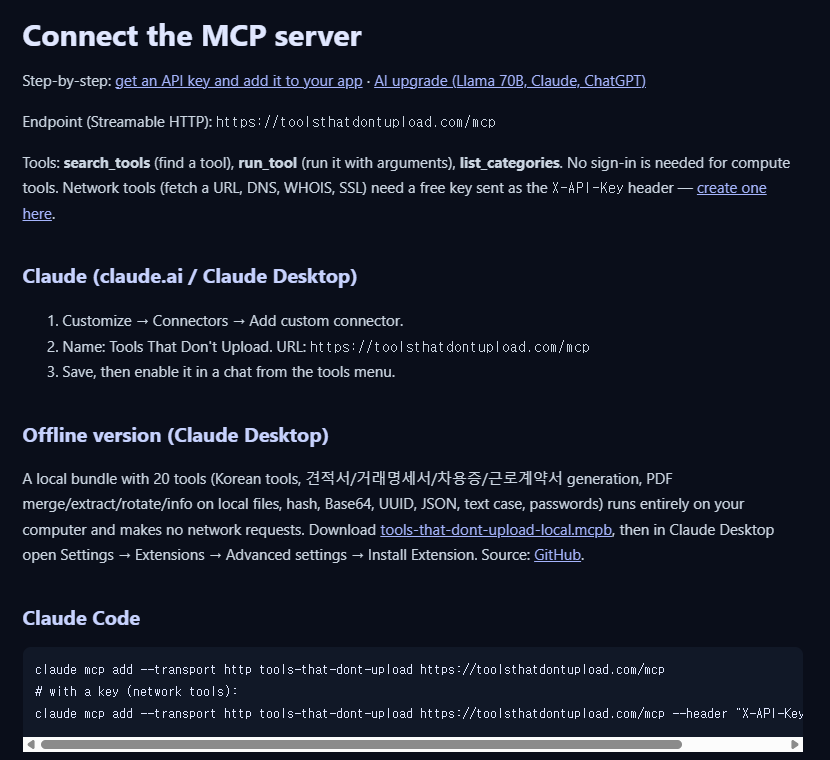
Claude Code
claude mcp add --transport http tools-that-dont-upload https://toolsthatdontupload.com/mcp

# with a key, for network tools:
claude mcp add --transport http tools-that-dont-upload https://toolsthatdontupload.com/mcp \
  --header "X-API-Key: ttdu_free_..."
Cursor
Add this to ~/.cursor/mcp.json. The headers block is optional.
{
  "mcpServers": {
    "tools-that-dont-upload": {
      "url": "https://toolsthatdontupload.com/mcp",
      "headers": { "X-API-Key": "ttdu_free_..." }
    }
  }
}
VS Code (GitHub Copilot)
{
  "servers": {
    "tools-that-dont-upload": { "type": "http", "url": "https://toolsthatdontupload.com/mcp" }
  }
}
Claude (claude.ai or Claude Desktop)
- Open Customize, then Connectors, then Add custom connector.
- Name it Tools That Don't Upload and paste the URL above.
- Save, then turn it on in a chat from the tools menu.
Why only three tools?
Registering 500 tools directly would flood the model's context and make it worse at picking the right one. So the server exposes three:
- search_tools finds tools by keyword and returns their parameters plus a tested example.
- run_tool runs a catalog tool with the arguments you pass.
- list_categories shows what is in the catalog (web, crypto, math, conversion, PDF, Korean tools and more).
The model searches first, then runs. In practice that is two short calls.
A real round trip
Here is an actual exchange, sent with plain HTTP so you can see the shape. First the search:
curl -s https://toolsthatdontupload.com/mcp \
  -H "Content-Type: application/json" \
  -H "Accept: application/json, text/event-stream" \
  -d '{"jsonrpc":"2.0","id":1,"method":"tools/call",
       "params":{"name":"search_tools","arguments":{"query":"sha256","limit":2}}}'
It returned two matches, hash and hash_compare, out of 503 catalog entries, each with its parameters and an example. Then the run:
{"jsonrpc":"2.0","id":2,"method":"tools/call",
 "params":{"name":"run_tool",
           "arguments":{"tool":"hash","arguments":{"text":"hello","algorithm":"SHA-256"}}}}
Response:
{"algorithm":"SHA-256",
 "hash":"2cf24dba5fb0a30e26e83b2ac5b9e29e1b161e5c1fa7425e73043362938b9824",
 "length":64}

_meta: { "com.toolsthatdontupload/egress": "none",
         "com.toolsthatdontupload/stored": false }
That _meta block is worth noticing. Every result says whether the tool contacted anything outside our edge (egress) and whether anything was kept (stored). For a hash it is "none" and "false", which is what you would hope.
Two things to keep in mind
- Your assistant sees the data. When a model calls a tool, the arguments and the result pass through the model provider. Our server not storing anything does not change what Claude, ChatGPT or Copilot do with their own context.
- Fully offline is possible. If that matters, there is a local Claude Desktop bundle with 20 tools (PDF merge and split on local files, hashing, Base64, UUID, JSON, Korean document generation) that makes no network requests at all. It is linked from the setup page.