I rotated a sideways PDF 90 degrees and made it worse
I built a fake "sideways scan" on purpose: a receipt-shaped test PDF with the text rotated 90 degrees, like a scanner fed it in wrong. Then I opened Rotate PDF and hit the 90 degree button, the obvious first guess. The result came out upside down. Not fixed, not unchanged, upside down. The direction that actually worked was 270.
Here's what I checked, in order, so I'd believe my own result.
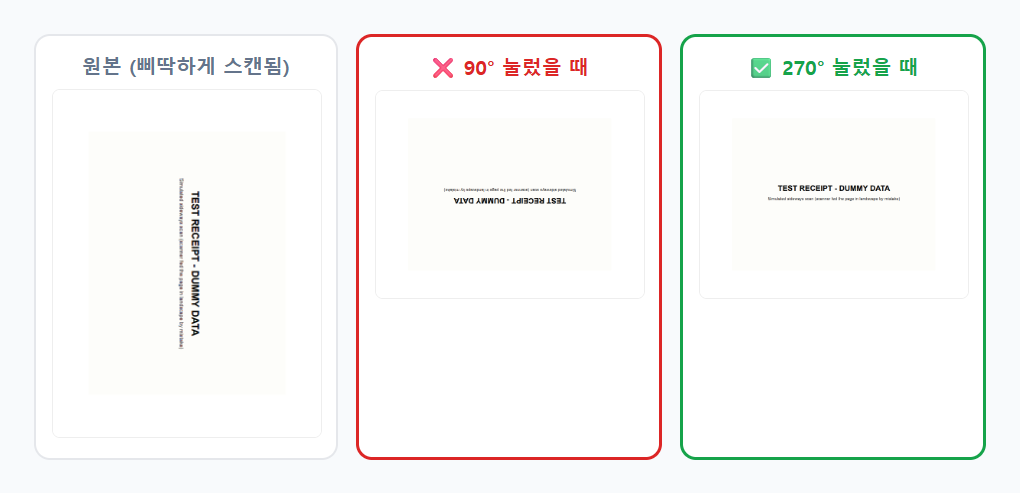
Why 90 degrees was the wrong guess
I assumed the page was rotated clockwise, so rotating it clockwise again (90 degrees) should undo it. It didn't, because the page was actually leaning the other way. Pressing 90 added another 90 on top of the existing lean, landing at 180 total, upside down. The fix turned out to be 270 (the same as rotating -90, counter-clockwise), which cancelled out the original lean instead of stacking on it.
Nothing about the tool's UI tells you which direction a given page is leaning before you click; you find out by trying one angle, looking at the result, and going the other way if it's wrong. That's not a bug, it's just how fixing orientation works when you can't see the file's actual rotation state ahead of time. Two tries got me to upright, with no file corruption on the "wrong" attempt. I could re-upload the original and try again.
Checking it wasn't just a different view, but a real saved rotation
Before trusting the result, I wanted to rule out something I'd seen mentioned about PDF viewers: some have a "view rotation" that only changes how the page displays on screen, without touching the saved file. So I measured the actual page dimensions of the downloaded file, not just how it looked in a preview.
Original page: 618 x 800 pixels (portrait). After the 270 degree rotation: 800 x 618 pixels (landscape). The width and height genuinely swapped in the saved file, which is what a real rotation does and a display-only rotation would not. I used a PDF renderer to check this directly rather than trusting a thumbnail.
The part I measured with the network tab open
Upload, both rotation attempts (the wrong one and the right one), and both downloads: zero network requests the entire time, confirmed with a request listener running from the moment I dropped the file in. The tool's own page says the file "never leaves your device," and for this basic version that held up end to end; nothing to argue with there.
If you want to rotate just one page, not the whole file
This basic hub tool rotates every page in the file by the same angle, which is fine when only one page in your PDF is sideways. For per-page control (rotate page 3 but leave the rest alone), the fuller version is a separate tool on dagotools.com with individual thumbnails and a rotate button on each page, plus delete and reorder. I didn't test that one as deeply this time, it's a different enough interface that it deserves its own look.
Try it yourself: Rotate PDF, or browse the full tool list. If you build things, the same rotation job is also a REST endpoint and reachable through the MCP server.