I told a billing tool which column was which. It broke on a field I never touched.
I had two fake companies and a four-row spreadsheet. I was trying to see if a brand-new, not-yet-reviewed workflow could turn one table into separate billing documents per client. It did, and it did the math right. Then I tried to be helpful and tell it exactly which column was which, and it broke on a field I never told it about.
The setup
The tool is called "Batch quotes and transaction statements": one CSV (client, item, qty, unit price, discount, tax class), plus a few document options (supplier name, date, VAT mode, rounding), and it's supposed to produce a per-client document and a combined totals sheet. I made up two companies and four line items, one of them tax-exempt, to see if it would actually split the tax correctly.
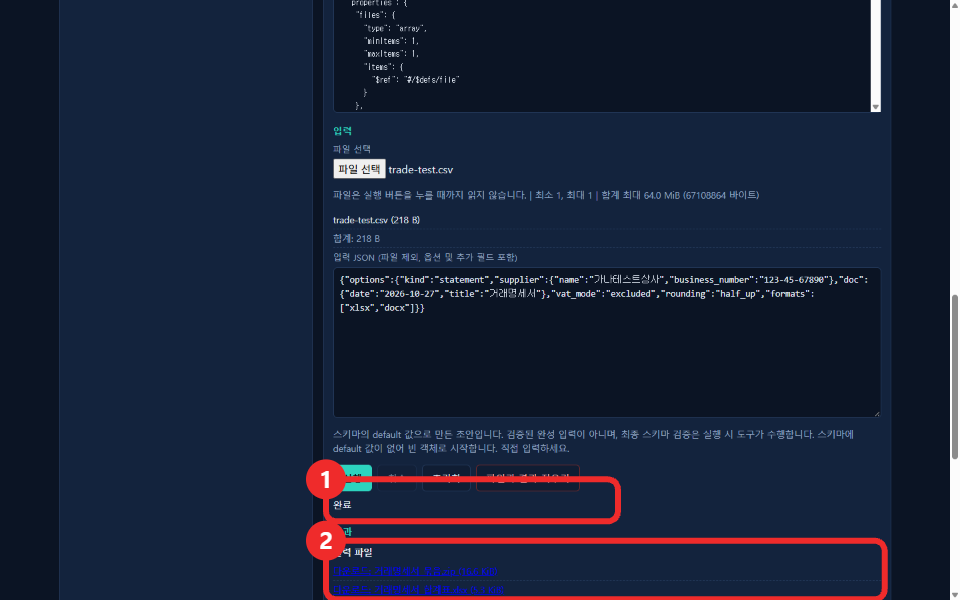
Leaving it alone worked perfectly
With no "columns" option specified, the auto-detection matched my Korean headers to the right fields, grouped by client, and produced two documents plus one totals file. I unzipped the output myself and read the raw XML inside the generated .docx instead of trusting the summary screen.
Client A: 노트북(laptop) x2 @850,000 + 마우스(mouse) x5 @15,000 (10% off)
  supply 1,767,500 / tax 176,750 / total 1,944,250

Client B: 모니터(monitor) x3 @220,000 + 키보드(keyboard) x10 @25,000 (5% off, tax-exempt)
  supply 897,500 / tax 66,000 / total 963,500
I did the arithmetic by hand against the raw document text. It matched to the won. The tax-exempt keyboard line showed the literal word "exempt" in the tax column instead of a number, and the exemption was correctly excluded from the client's tax total rather than just zeroed out and still counted. That's a detail that's easy to get wrong and I was glad to see it right.
Then I tried to help
I got curious whether I could lock in the column mapping explicitly instead of trusting auto-detection, the kind of thing you'd want in production so a renamed header doesn't silently break your pipeline. I added one mapping: client to my Korean header for "client". Nothing else. I didn't touch anything related to addresses.
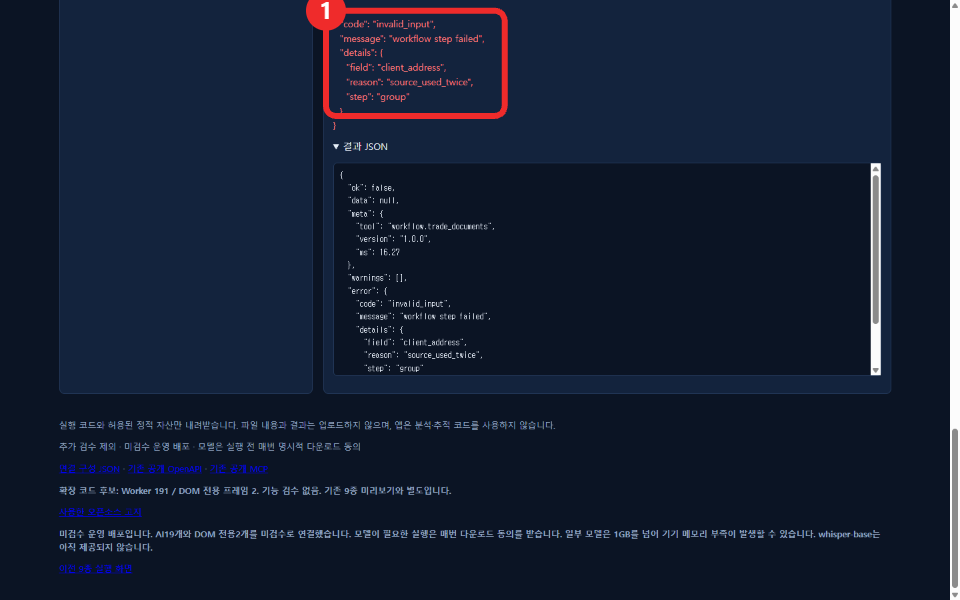
{
  "code": "invalid_input",
  "message": "workflow step failed",
  "details": {
    "field": "client_address",
    "reason": "source_used_twice",
    "step": "group"
  }
}
I reran it twice with the same single-key mapping to rule out a fluke. Same error, same field, both times. Auto-detection off, manual override on, instant failure on a property I never set. My best guess, and it's only a guess since I don't have the source, is that supplying any explicit column mapping switches the tool into a stricter merge path where its internal default for client_address collides with something derived from my own mapping. Whatever the exact cause, the practical lesson is simple: leave the column names alone for now.
What I'd tell someone trying this today
If your spreadsheet headers are reasonably plain language, don't fight the defaults. Auto-detection handled client/item/quantity/unit price/discount/tax class without being told anything, split tax-exempt lines correctly, and the generated documents matched a real two-copy Korean statement format down to the Korean-script written-out total. The one thing to avoid, at least today, is the manual column override. I filed it as a known limitation rather than quietly working around it, because that's the kind of thing that fails silently in someone's real invoicing run.
No file ever left the browser for any of this. I had a network request listener running through both the working run and the broken one: zero requests either time, consistent with the tool's own "no external transmission" note.
You can try the workflow yourself at workflows.toolsthatdontupload.com, read more about how these unreviewed workflows work on the docs page, or see an earlier test of a different new workflow in the file-sorting one that flagged documents I never sent.