I drew a fake product photo and the AI background remover kept the wrong shape
I needed a quick test image for a background remover and didn't feel like hunting for a real photo, so I drew one on a canvas: a blue rounded rectangle (280x200px, measured by hand) with a yellow circle sitting in the middle of it, on a white background. Close enough to a product mockup, I figured. I was wrong about what "close enough" meant to the AI.
What I expected
I expected the AI auto mode to treat the white page as background and keep everything else, same as it does with photos of people or products against a plain wall. I uploaded the PNG, turned on "Trim empty margins," and set the background to white for the download.
What actually happened
Without trimming, the output was still 400x300, the same canvas size, with just the white turned transparent. Normal. But with trimming on, the result came out 100x100, and when I opened the file it was just the circle. The entire blue rectangle was gone too, along with the white page it sat on. The model had decided the rectangle counted as background, not subject, and only the circle survived.
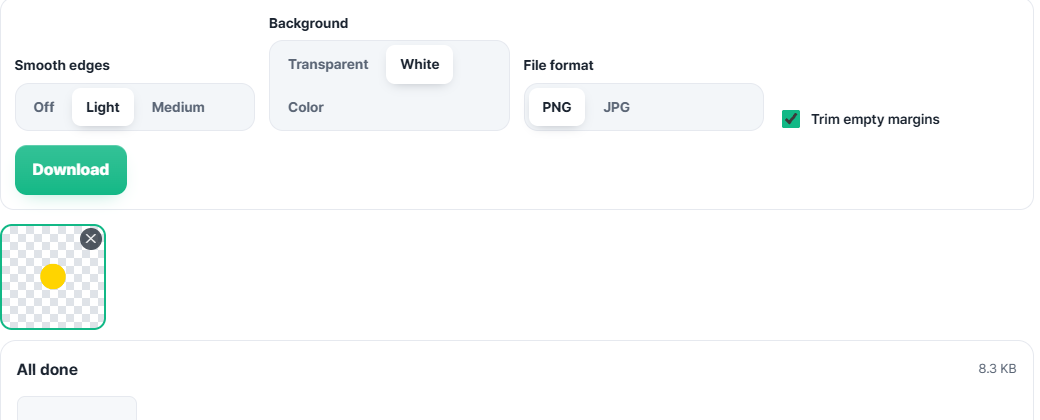
My best guess, not confirmed by reading the model internals, is that the segmentation model is trained on saliency in real photos, and a large flat-colored rectangle filling most of the frame doesn't read as a distinct foreground object the way a round, isolated shape does. A real product photo with actual shading and edges would probably not trigger this. A flat vector mockup apparently can.
Why this matters more than it sounds
If you're testing an AI tool with synthetic or illustrator-made mockups instead of camera photos, don't assume a pass on fake data means a pass on real data, and don't assume a fail means the tool is broken either. I ran the same upload twice to make sure it wasn't a fluke. Same result both times.
The one thing I did confirm cleanly, same as every other file tool I've tested here: I watched the network requests panel through both uploads, trimmed and not, and the count stayed at zero the whole time. Whatever the model decides to keep or throw away, it decides it in the tab, not on a server.
Free background remover, no upload: https://dagotools.com/en/tools/remove-background/. More tools and the MCP server that wraps all of them: https://toolsthatdontupload.com/tools/.