My network tab said zero requests. A service worker was quietly disagreeing with it.
I have a habit when I test any tool that touches something sensitive: attach a request listener before I do anything, then count. Zero requests means nothing left the tab. That habit has never lied to me before. This time it did, sort of, and finding out why took longer than the actual feature test.
The feature: generate a password, then ask if anyone else already has it
dagotools' password generator has a second box under the generator itself: paste in a password you already use, and it tells you how many times that exact password shows up in known breach data, using the Have I Been Pwned Pwned Passwords API. The page explains the privacy mechanism up front: it hashes your password with SHA-1 locally, sends only the first five characters of that hash to the API (k-anonymity), and the API sends back every hash suffix that starts with those five characters so the real comparison happens in your browser, not on a server that ever sees your password.
That's a reasonable design. I wanted to see it work, not just read about it.
Testing the two most predictable passwords on the internet
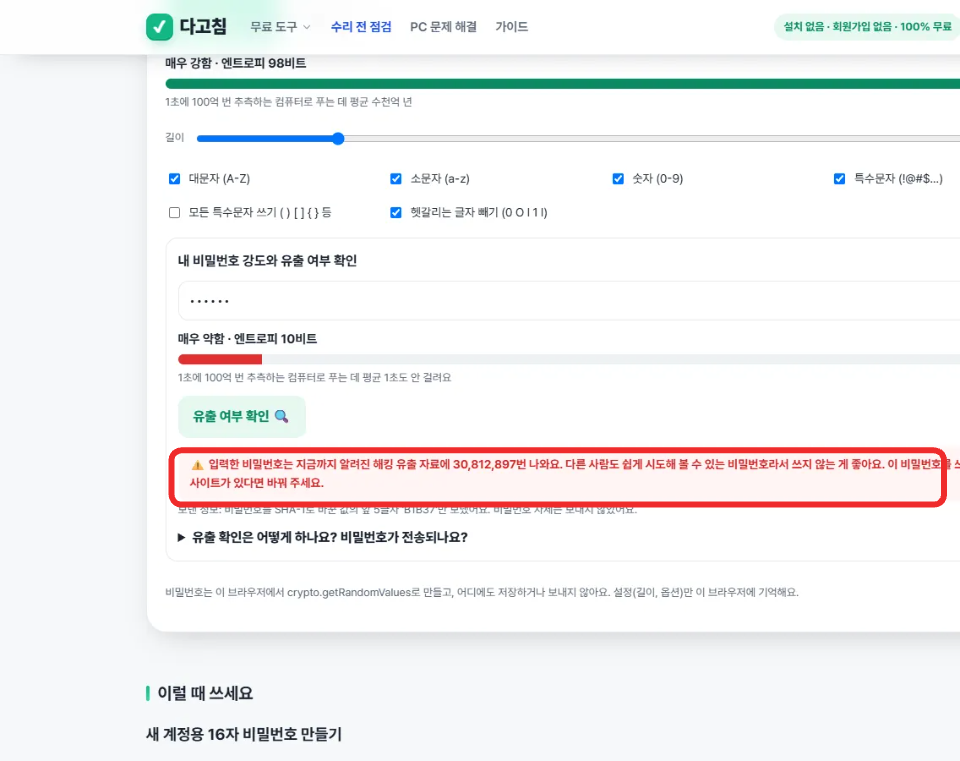
I typed qwerty into the check field and pressed the button. The result: 30,812,897 appearances in known breach data. I read that number three times assuming I'd misread a decimal point. I hadn't. password123 came back at 2,266,543. Both triggered the same warning: other people can easily guess this, don't use it anywhere.
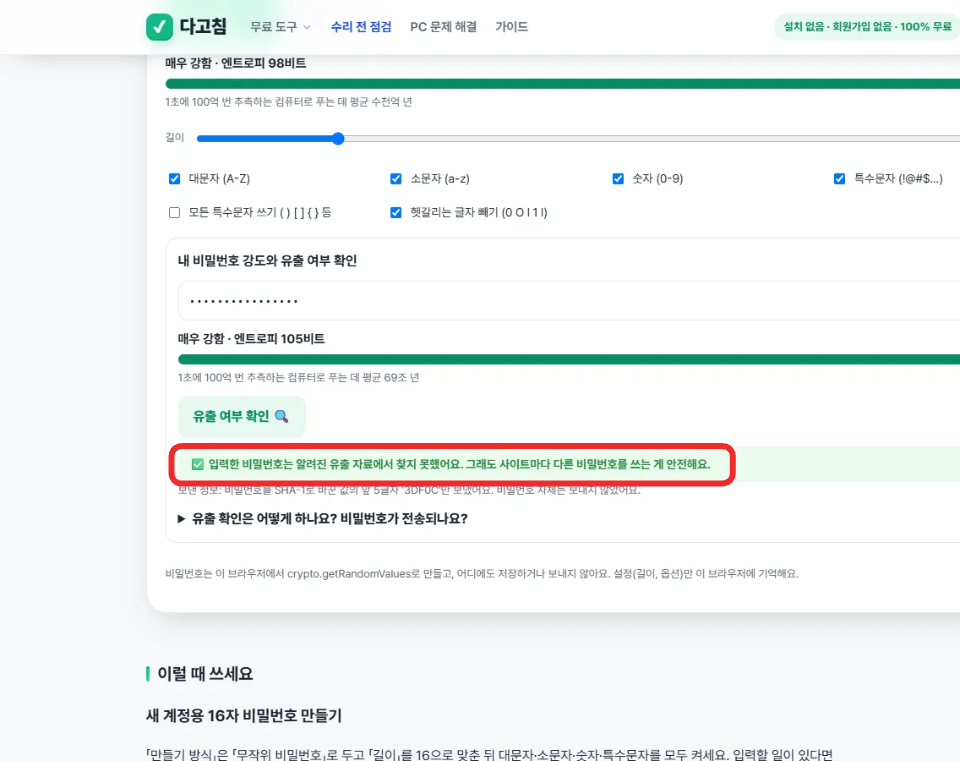
Then I generated a fresh 16-character password with the tool's own randomizer and ran the same check on it. Result: not found in any known breach. I repeated that with a second freshly generated password, same result. Not surprising given the entropy (98 to 105 bits reported on screen), but I'd rather see "not found" with my own eyes than assume it.
Where my usual check stopped being reliable
Here's the part that actually slowed me down. I had a request listener attached the whole time, the same one I use on every tool I test. Total requests logged for both the weak-password checks and the strong-password checks: zero. My first instinct was to take that as confirmation the privacy claim was airtight, maybe even stronger than advertised, everything purely local.
Except the page kept printing a very specific string every time: "Sent: first 5 characters of your password's SHA-1 hash: 'B1B37'." That's not a generic privacy disclaimer, that's a value that changes per password, which means something is actually being computed and sent somewhere, not just displayed as a static reassurance. A request listener showing zero while the UI reports a specific outbound payload is a contradiction, not a confirmation, and I'd rather chase a contradiction than publish a number that flatters the result.
I checked the page's registered service workers and found one, sw.js. That's almost certainly where my request listener lost visibility: requests that get intercepted or routed through a service worker's fetch handler don't reliably surface the same way to a page-level request listener. The network activity was real, my counting method for seeing it just wasn't the right tool for a page with a service worker in the mix.
I switched to reading the browser's own resource timing entries instead of relying on the request listener. That view showed exactly what the on-screen text had been claiming the whole time: a fetch to api.pwnedpasswords.com/range/B1B37 for the first weak password, /range/CBFDA for the second, and two more range requests, one per hash prefix, for the two freshly generated passwords. Four checks, four outbound requests, each one carrying only a five-character hash prefix and nothing resembling the actual password.
So what actually left the tab, and what didn't
The password itself never left the browser at any point, I confirmed that by checking exactly what the resource timing entries contained: a URL path with a five-character hex string, nothing else, no body, no additional headers carrying the input. The number of matches, the comparison against the full response list, the "not found" or "found 30 million times" verdict, all of that happened locally after the response came back. What did leave the tab was a request that reveals, at most, that some password starting with those five hash characters exists somewhere in my browsing session, not which one.
My zero-requests check wasn't wrong about privacy, the password really didn't go anywhere. It was wrong about network activity existing at all, because a service worker was sitting in a place my usual tool doesn't look. Lesson for next time: when a page registers a service worker, resource timing is the more honest read than a page-level request listener.
What I'd check if I were you
If you want to verify this yourself rather than take my word for it: open devtools, go to the Network tab (which does see service-worker-routed requests, unlike a page-level listener), type a throwaway password, and watch for a single short request to api.pwnedpasswords.com/range/<5 characters>. If you see a request carrying anything longer than five characters or anything resembling your actual input, that would be the thing worth reporting, not the feature working as described.
Disclosure: I built dagotools and run toolsthatdontupload.com. All numbers above came from four live checks against the Pwned Passwords API on 2026-11-05, nothing here is simulated.