My HEIC-to-JPG tool's own help text says Chrome on Windows usually can't do this. It did it anyway.
Correction, November 5, 2026: I ran this test in a Chromium-based browser, not in regular Google Chrome. This HEIC tool has no decoder of its own; it only works when the browser itself can read HEIC. So my result does not show that regular Chrome, Edge or Firefox on Windows can do it. The tool page's note ("Chrome, Edge and Firefox on Windows or Android usually cannot decode HEIC by themselves") is the right expectation for most people. If it fails for you, use the Windows HEIF Image Extensions route described below.
I wrote the "Limits" section on my own HEIC to JPG tool. It says, in my own words: "Works in Safari on Mac, iPhone and iPad. Chrome, Edge and Firefox on Windows or Android usually cannot decode HEIC by themselves; the page then shows alternatives." Then I actually tested it on my own Windows machine, in Chrome, and it converted the file fine. I wrote a warning about my own tool that turned out to be wrong for my own browser.
Why I wrote that warning in the first place
HEIC is the photo format iPhones have defaulted to since iOS 11. It's built on HEVC compression, which carries patent licensing costs, so Windows and most non-Apple browsers haven't historically shipped a built-in decoder for it the way Safari has. The tool itself doesn't ship its own HEIC/HEVC decoder either, it just asks the browser to decode the image using whatever codec support the operating system already has, draws the result on a canvas, and exports that canvas as a JPEG. If the browser can't decode HEIC, there's nothing for the tool to draw. That's a reasonable, historically accurate thing to warn people about.
Running an actual file through it instead of trusting my own documentation
I grabbed a real, CC0-licensed HEIC sample file, 547.4 KB, and dropped it onto the tool on my regular Windows Chrome install, the same one I use every day, nothing special configured. I expected the "can't decode" fallback path to show up. Instead the page said "Converted to JPG" and handed me a 209.5 KB file.
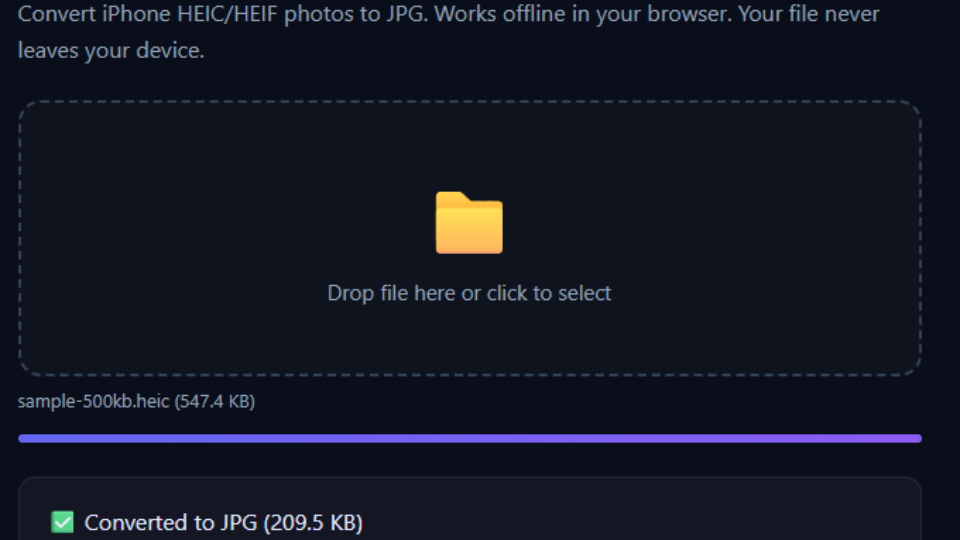
I didn't trust one run. I reloaded the page and dropped the same file again. Same result: converted, downloadable, no fallback message. Two for two.
Counting network requests, because "it worked" isn't the same as "nothing left my machine"
I attached a request listener before the second run so I wasn't just eyeballing a loading spinner. Total requests logged across both conversion attempts: zero. The file went in, got decoded by whatever HEIC support my installed Chrome build actually has, got redrawn on a canvas, and came back out as a JPEG, all inside the tab. Nothing about this test depended on a server doing the decoding for me, which is the whole point of the tool existing in the first place.
So was the warning just wrong?
Not exactly wrong, just out of date for my setup. Browser-level codec support isn't a fixed thing; Chrome versions have been quietly expanding which image formats createImageBitmap and canvas decoding can handle without a polyfill, and that rollout doesn't hit every Chrome install, every Windows build, or every hardware configuration at the same time. "Usually cannot" was true across a wide enough sample of browsers and OS versions that I kept the sentence, but it clearly isn't universally true anymore, and my own machine is proof of that. I've left the warning up rather than deleting it, because for someone on an older Chrome, Edge, or Firefox build on Windows, it's still the accurate expectation, and the tool still shows a fallback message with alternatives when the browser genuinely can't decode the file.
What the fallback path actually looks like
I couldn't force my own up-to-date Chrome into the failure case to screenshot it honestly, so I'm not going to fake one. What I can tell you, because it's in the tool's own code, not a guess: when createImageBitmap rejects a HEIC file, the page shows a short message pointing at two alternatives, Windows' own free "HEIF Image Extension" from the Microsoft Store (lets Photos and File Explorer open HEIC directly, and you can re-save as JPG from there one file at a time), or switching the camera format to "Most Compatible" in iOS Settings going forward so new photos save as JPG instead of HEIC in the first place. Neither of those is instant for a batch of fifty photos, which is exactly the situation a browser-based converter is supposed to help with when it does work.
Other things I checked while I was in there
A few details from the tool's own documentation that I re-verified rather than assumed while writing this:
- Live Photos: only the still frame converts, the motion portion is dropped. I didn't have a Live Photo sample to re-test, so I'm repeating the documented behavior rather than claiming I re-verified it today.
- EXIF metadata (camera, GPS, capture time) does not survive the conversion, by design, since the canvas re-draw doesn't carry metadata forward.
- Only the first image of a burst converts, same reasoning as Live Photos.
Why I'm writing a post about my own warning being outdated instead of just quietly fixing it
I could have just deleted the "usually cannot" sentence and moved on, but that would have replaced one unverified claim (it doesn't work) with another one I also haven't fully verified (it works everywhere now). I don't have a fleet of Windows machines running every Chrome, Edge, and Firefox version to confirm where the line actually is today. What I do have is one real, repeatable result on one real browser, and I'd rather tell you exactly what I tested than round it up into a bigger claim. If you try this on an older browser and get the fallback message, that's not a bug, that's the warning doing its job correctly, just not on my particular setup.
Tool used: HEIC to JPG, no upload, no signup. Related: Compress Image if the converted JPG is still too big, or my earlier post on checking a different tool's own claims against what it actually does.