I put a comma in a WiFi QR password to see if it would break. It got escaped instead.
I was making a WiFi QR code for a guest network and the password happened to have a comma in it. My first thought was "that's probably going to break the QR." QR codes just look like noise to a human, so I couldn't check by staring at it. I had to decode the thing I'd just generated to find out.
Setting up the test: a password built entirely out of trouble
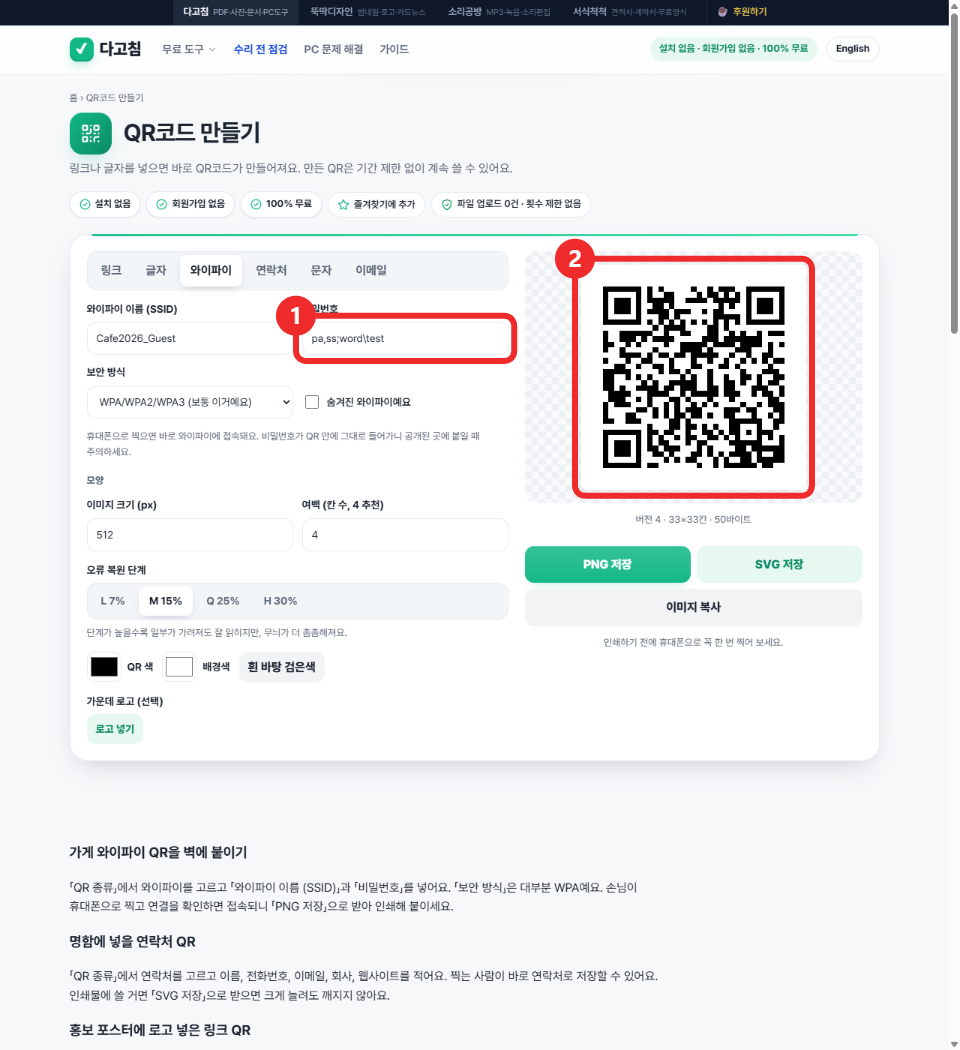
I used dagotools' QR code generator and switched to WiFi mode. SSID: Cafe2026_Guest. Password: pa,ss;word\test, deliberately stuffed with a comma, a semicolon, and a backslash, the three characters that WiFi QR codes use as field separators internally. If the generator was going to get this wrong, this password was the one to find out with.
The page generated a QR instantly, no upload spinner, no network activity I could see with my eyes. That's the problem with QR codes though: "looks fine" and "is actually correct" are two different claims, and only one of them is checkable by looking.
Decoding my own QR instead of trusting it
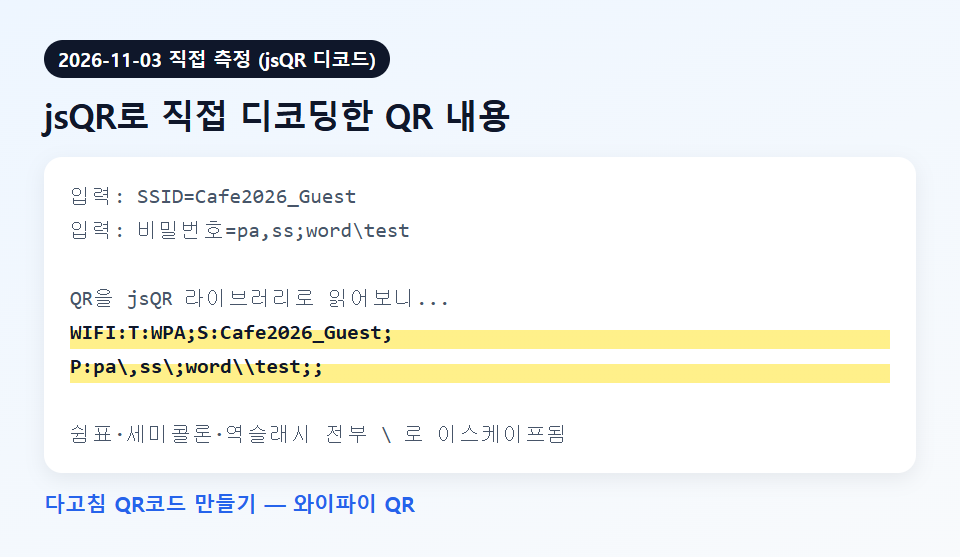
I loaded jsQR, a small open-source QR decoder, directly into the page and read the canvas pixel data back out of it. No phone, no separate scanner app, just the same browser tab reading its own output. The decoded string:
WIFI:T:WPA;S:Cafe2026_Guest;P:pa\,ss\;word\\test;;That is not the password I typed. It's the password I typed with every comma turned into \,, every semicolon turned into \;, and the one real backslash doubled into \\. That's the correct behavior defined by the (unofficial but widely implemented) WiFi QR string format: those three characters are reserved as delimiters, so anything meant literally has to be escaped or a QR reader app would misparse where the SSID ends and the password begins. The generator wasn't failing to handle my weird password, it was handling it exactly the way it's supposed to.
Watching the network tab while I typed the password
I attached a request listener to the page before I typed anything, then went through the whole SSID-password-generate sequence again. Total requests logged: zero. The QR was built, re-encoded, and rendered entirely in the tab, nothing left to ask a server whether my comma-and-semicolon password was valid. I also pulled the page's response headers to check the Content-Security-Policy, out of habit from testing tools on the main toolsthatdontupload.com domain, where connect-src is usually locked down to a short allow-list. This page's CSP only sets frame-ancestors 'self', no connect-src directive at all, so the header itself isn't the thing proving nothing left the tab here, the empty request log is. Worth being precise about that distinction instead of citing a header that isn't actually doing the restricting on this domain.
Checking the same thing on a contact card, because why trust one data point
I switched the tool to contact (vCard) mode and used a name with a comma and a company name with a semicolon: 테스트, 이름 and 다고침; 테스트팀. Decoded output:
N:테스트\, 이름;;;;
ORG:다고침\; 테스트팀
Same pattern, same escaping, on a completely different QR payload type (vCard instead of the WiFi config string). That's two independent code paths in the same tool both doing the escaping correctly, which is a better signal than one lucky test.
I also checked the one thing the tool tells you about: protocol prefixes
Switching to link mode, I typed dagotools.com/tools/qr-code/ with no protocol. The page printed a small note under the field, "we added https:// to the start," and decoding confirmed it: https://dagotools.com/tools/qr-code/. Typing http://example.org/test with an existing protocol left it untouched, still http://, not force-upgraded. Small thing, but it's the kind of silent behavior I'd want to verify rather than assume.
What I'd actually warn you about instead
The escaping is solid, so that's not where the risk is. The actual thing to know: a WiFi QR code contains the plaintext password, not a hash or a token. Anyone who photographs the QR code on your wall can read the password out of it later, the escaping only protects the parsing, not the secrecy. If you're printing one for a cafe or office, a separate guest network with no access to internal devices is the real mitigation, not a cleverer password.
I went in expecting to find a bug, honestly. Testing software by deliberately feeding it the characters most likely to break a string parser is a habit from years of filing tickets that start with "well it works if you don't type a comma." This was one of the rare times the answer was just "it's fine," which is a less interesting blog post to write but a better QR code to have on your wall.
Try it yourself: QR code generator (WiFi, link, text, contact, SMS, email), or browse the full tool list.