I put my API key in the URL by habit. The server politely told me it does not exist there anymore.
Old habit: when a tool needs a key, I stick ?key=xxx on the end of the URL and move on. It has worked on enough APIs over the years that I do not think about it anymore. On our own API it does not work, and I only found that out because I tried it on purpose for this post instead of reading the docs like a normal person.
This is the setup walkthrough for getting a free key and wiring it into Cursor, Claude Code and plain curl, plus the specific mistake above so you can skip it.
Getting a key (claude api keys, in practice)
No account, no password. Open /api-keys/, type an email, click once. The key is shown exactly one time:
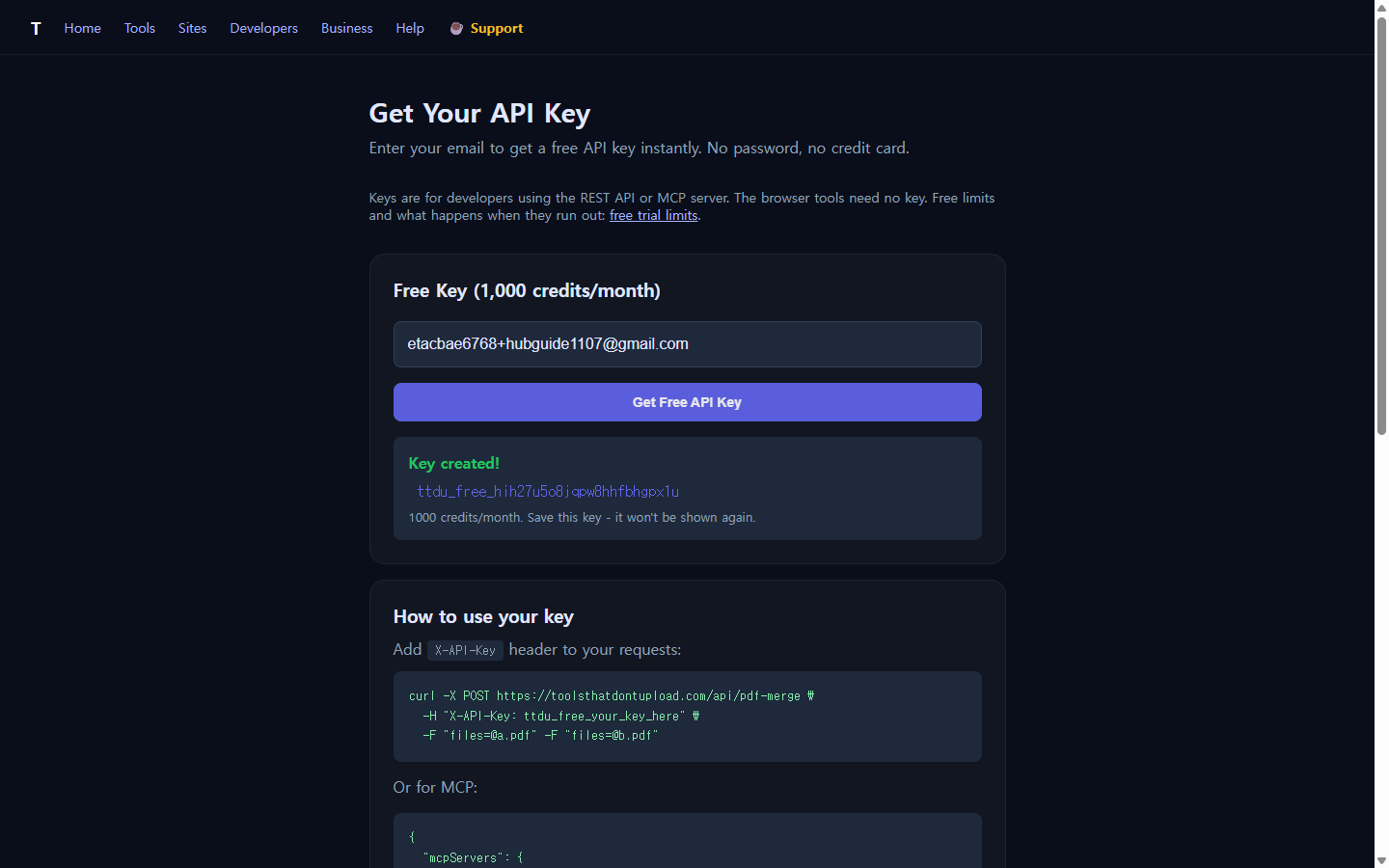
1,000 credits a month on the free tier. I checked the balance right after creating the key:
curl -H "X-API-Key: ttdu_free_..." https://toolsthatdontupload.com/api/keys/usage
{"tier":"free","monthlyCredits":1000,"used":0,"remaining":1000,"prepaidBalance":0,"period":"2026-11"}
The mistake: key in the URL
Compute tools and PDF tools do not need a key at all. Network tools (DNS, WHOIS, fetch, SSL) do, because they reach out to someone else's server on your behalf and that costs credits. I tried the lazy version first:
POST /api/dns-lookup?domain=example.com&key=ttdu_free_...
→ 401 "API Key Required"
No key found, even though it was right there in the URL. The docs call out query-string auth as deprecated, and this is apparently not a soft deprecation; the server just does not look there. Move the same key into a header and it works on the first try:
curl -X POST https://toolsthatdontupload.com/api/dns-lookup \
  -H "Content-Type: application/json" \
  -H "X-API-Key: ttdu_free_..." \
  -d '{"domain":"toolsthatdontupload.com"}'

→ 200, x-credits-used: 20, x-credits-cost: 20
One DNS lookup cost 20 of my 1,000 monthly credits. The response headers report the cost on every call, so you can watch the meter without a separate usage request if you are scripting something.
Cursor API key: the five lines that matter
For Cursor and Claude Code the key does not go in a request you write by hand, it goes in an MCP server config once, and every tool call after that reuses it. Cursor reads ~/.cursor/mcp.json:
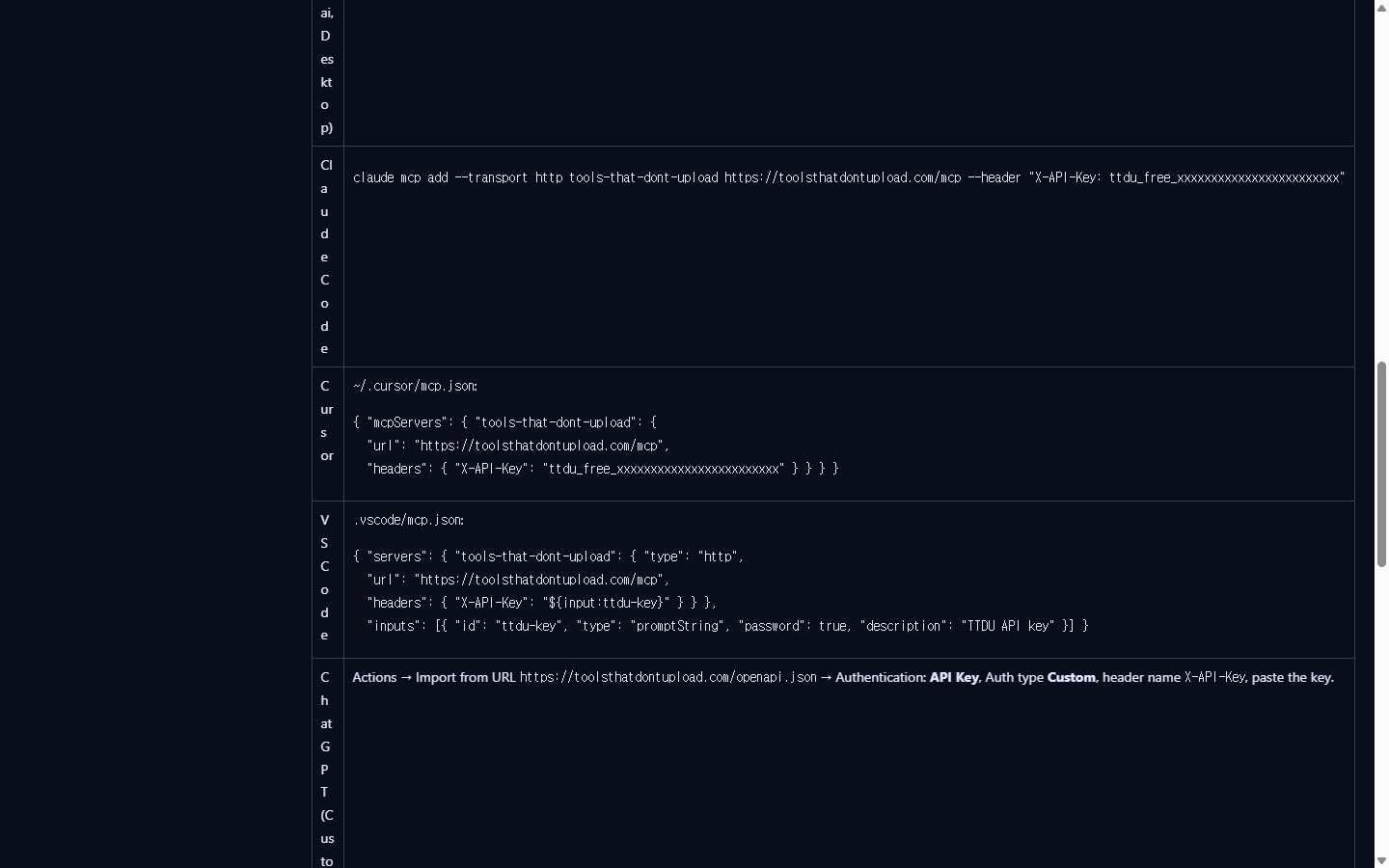
{ "mcpServers": { "tools-that-dont-upload": {
  "url": "https://toolsthatdontupload.com/mcp",
  "headers": { "X-API-Key": "ttdu_free_..." } } } }
Claude Code adds the same server from the terminal instead of a file:
claude mcp add --transport http tools-that-dont-upload \
  https://toolsthatdontupload.com/mcp \
  --header "X-API-Key: ttdu_free_..."
VS Code is the only one of the three that bothers to prompt for the key instead of hardcoding it in the file, using an inputs block with "password": true so it is not sitting in plain text in your repo. Worth copying that pattern even outside VS Code if the config file is ever going to touch version control.
What actually needs the key, and what does not
Easy to assume every tool call needs auth once you have a key. It does not:
- Compute, text, PDF and Korean-language tools: no key, no quota hit.
- Network tools (DNS, WHOIS, SSL check, URL fetch) and the larger AI models: key required, credits deducted per call.
If a 401 shows up on something that feels like it should be free, that is the tell: it is a network tool, not a missing-key bug.
Keeping it out of places it should not be
The key is a plain string with no built-in expiry check beyond revoking it, so the usual rules apply: not in client-side JavaScript, not in a public repo, not pasted into a shared prompt. Revoking is one call:
curl -X POST https://toolsthatdontupload.com/api/keys/revoke -H "X-API-Key: ttdu_free_..."I revoked the test key I made for this post once the screenshots were done; no reason to leave a working credential sitting in a draft folder.
FAQ
Does a free key expire? Not on a timer; the 1,000 credits reset monthly and the key itself stays valid until revoked.
Can I use the same key in curl and Cursor at the same time? Yes, one key, multiple places; usage from both counts against the same monthly total.
Why 401 instead of a quieter error for the query-string attempt? It is treated the same as no key at all, which is the whole point of deprecating it: nothing reads that parameter anymore, so leaving it in old scripts fails loudly instead of silently leaking a key into logs.
Full reference with every client (Claude, ChatGPT custom GPTs, Python, JavaScript, n8n) is in the API keys docs. If you are connecting an editor rather than calling the REST API directly, the MCP server setup post covers what the tools actually do once connected. Everything above was run against the live developer API, not a staging copy.