I ran OCR on a receipt twice, once with two languages and once with one, and the confidence score lied to me
I generated a fake receipt with a canvas script (no real purchase data, just text I typed myself: a coffee, a cheesecake, a total), ran it through a free browser OCR tool twice, and changed exactly one setting between runs: which languages it should expect. The run that got the total number wrong reported a higher confidence score than the run that got it right. I had to read that twice before I believed it.
The setup
I built the test image myself with a small canvas script so I'd know exactly what the "ground truth" text was: a Korean line for an Americano at 4,500 won, a line for cheesecake at 6,800 won, and a total line reading 11,300 won. No real names, no real transaction, nothing that could leak anything if I got it wrong. Then I uploaded it to dagotools.com's image-to-text tool, which runs OCR entirely in the browser and lists a language dropdown before you hit the read button: Korean+English, English, Korean, Spanish, Portuguese, French, German.
The default is Korean+English, which seemed like the safe choice for a Korean receipt that also happens to contain Arabic numerals. More languages should mean more coverage, not less accuracy. That was my assumption going in.
Run one: the default setting broke the total
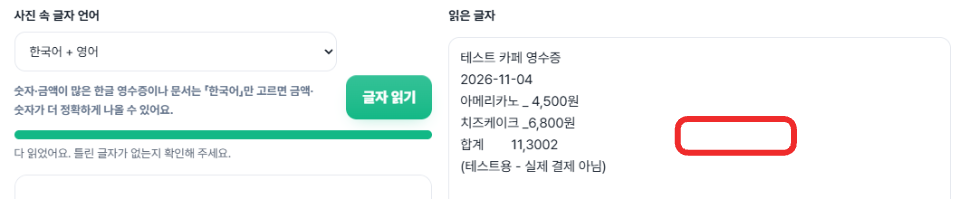
With Korean+English selected, the tool read the item lines correctly: Americano 4,500won, cheesecake 6,800won, even the date. The total line, the one number that actually mattered, came back as "11,3002" instead of "11,300won". I ran it a second time on the same file with no changes, and got the exact same wrong digits both times, so this wasn't a one-off glitch.
Run two: dropping English fixed the number
I switched the dropdown to Korean only and read the same file again. This time the total came back exactly right: "11,300won". Nothing else about the test changed, same image, same tool, same browser tab.
What I didn't expect was the confidence number sitting right under the result. The broken Korean+English run reported 84% confidence. The correct Korean-only run reported 82%, two points lower, for the run that actually got the number right. The tool itself also displays a line of guidance under the language dropdown now: receipts and documents with a lot of digits read more accurately with Korean only selected. That's a real, useful hint, and it happens to match exactly what I measured.
What the confidence score is actually measuring
I went in assuming a confidence percentage meant something like "percent chance this text is correct." After this test, I think it's closer to "how certain the model was about each character it picked," averaged across the whole result, regardless of whether the character it picked was the right one. A model can be very sure about a wrong character. That's the uncomfortable part: the score moved in the wrong direction exactly when it mattered most, on the number I cared about.
If you're pulling numbers off a receipt, an invoice, or anything with a dollar sign (or a won sign) attached, don't trust the confidence percentage as a correctness guarantee. Read the output against the original, character by character, on the fields that matter. I would not have caught this by skimming; "11,3002" and "11,300won" look close enough at a glance that I nearly moved on.
Checking the privacy claim while I was at it
Since I had a request listener open from an earlier habit of counting network calls, I left it running for both OCR runs. Upload through both results: zero network requests. The page's own copy says the recognition data (roughly 1 to 4MB per language) is fetched once and cached in the browser, and after that the image itself never leaves the tab. That matched what I measured, so at least the "your receipt doesn't go anywhere" part of the pitch holds up.
Takeaway
If your image has a lot of digits in it, and you only need one language, pick the narrower language setting on an OCR tool rather than the broadest one. More language options is not automatically more accuracy, and the confidence score next to the result is not a substitute for actually checking the number against the source.
One limitation worth being honest about: this was two runs on one synthetic receipt, not a large statistical sample. I'm not claiming Korean-only is always more accurate than Korean+English for every document. What I can claim is narrower and more useful: on this specific digit-heavy receipt, the broader language setting produced a wrong total twice in a row, the narrower setting produced the correct total, and the confidence score did not flag the difference. That's reproducible on my end, and it's the kind of thing a confidence percentage alone will never tell you.
Tool used: dagotools.com/tools/image-to-text/ (free, no signup, runs in the browser, part of the same project as toolsthatdontupload.com).