I grepped my own blog for the JSON-LD XSS bug people warn you about. It was there.
I was leaving a comment on someone else's post about JSON-LD and XSS, the classic one: if you build a <script type="application/ld+json"> block by just calling JSON.stringify() on a string, and that string ever contains </script>, the browser closes your script tag early and whatever comes after runs as plain HTML. I'd read about this pattern a dozen times. I'd never once checked whether I'd done it myself.
So I stopped writing the comment and went and checked. Every page on this blog, including the one you're reading, prints a BlogPosting and a BreadcrumbList JSON-LD block built from the post's own title. I opened the build script and ran the exact test string through it.
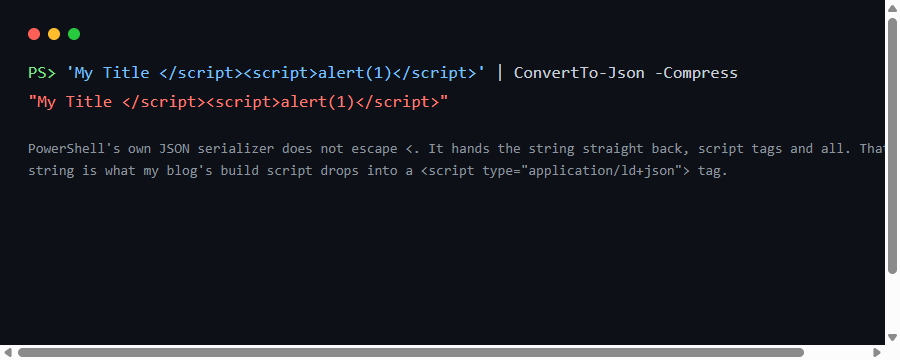
ConvertTo-Json, run on a string with a fake closing script tag inside it. Nothing got escaped.PS> 'My Title </script><script>alert(1)</script>' | ConvertTo-Json -Compress
"My Title </script><script>alert(1)</script>"That's the whole bug in one line. ConvertTo-Json escapes quotes and backslashes because the JSON spec requires it. It has no reason to touch <, because < is a perfectly legal character inside a JSON string. The problem only exists one layer up, where that JSON string gets pasted into an HTML <script> tag instead of an actual JSON API response. JSON doesn't know it's about to live inside HTML. The build script has to know that, and mine didn't.
Where the string actually goes
I went looking for the function that builds the $jsonld variable for this exact page type. It's a one-liner called JsonStr, and it has looked like this since this blog's first build in October:
function JsonStr([string]$s) { return ($s | ConvertTo-Json -Compress) }It's called on the post title and the post description, both of which end up inside the headline, description, and BreadcrumbList item names, which then get concatenated straight into a <script type="application/ld+json"> tag in the page head. I write every title and description on this blog myself right now, so the realistic risk today is close to zero. But "the only input is me, and I'll never make a typo or paste something with a stray </ in it while editing 38 post files by hand" is not a security property, it's an assumption I'd never written down and never tested. The moment any part of this pipeline takes a title from somewhere I don't fully control, a comment field, a future guest-post form, a title translated through another tool, this becomes a real hole instead of a theoretical one.
The fix, and checking it actually ships
The standard fix for this exact problem is to escape < as its Unicode sequence, \u003c, everywhere it shows up in a JSON string destined for a script tag. \u003c parses back to an identical string when JSON is read normally, but a literal < character never appears in the HTML source, so there's no closing tag for the browser to find early.
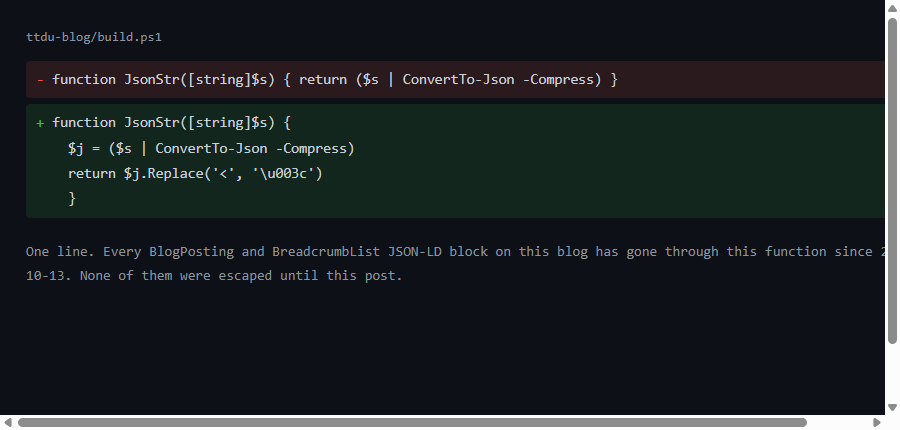
function JsonStr([string]$s) {
    $j = ($s | ConvertTo-Json -Compress)
    return $j.Replace('<', '\u003c')
}
Interestingly, I found this exact pattern already in use elsewhere in our own codebase, a translation build script for a different site had a helper called jsonInline that does the \u003c replace correctly. Somebody (me, a few weeks earlier) had already learned this lesson once, written the right fix in one file, and never carried it over to this one. That's arguably the more useful finding than the bug itself: a fix that lives in one script doesn't protect the next script you write, even if you wrote both of them.
After changing JsonStr, I rebuilt this blog and reran the exact same test string through a temporary post, then read the generated HTML file off disk and searched it for a literal < inside the application/ld+json block. There were none. Every < that used to be there now reads \u003c in the source and still parses to the correct string when I run the page's own JSON-LD through JSON.parse in a console. The deploy for this post is built with the fixed function, so this is also the first post on this blog whose own JSON-LD was escaped correctly from the moment it went live, rather than patched afterward.
Why I'm writing this up instead of just quietly fixing it
Every tool on the sites I run makes a promise that your file never leaves your browser. That promise only means something if I'm equally careful about the parts nobody's watching, like a build script's JSON-LD generator that nobody ever audits because it never visibly breaks anything. The bug didn't crash a page or throw an error once in five weeks of daily builds. It just sat there, correct-looking, wrong, waiting for a title with the wrong four characters in it.
If you generate JSON-LD, Open Graph tags, or any other data that gets dropped raw into a <script> block, this is worth two minutes to check yourself: take whatever function builds that string, feed it a value containing a literal </script>, and read the actual HTML it produces. Not what you assume it produces. If you've read about checking what a tool actually does instead of what it claims to do on this blog before, this is the same habit pointed at my own code instead of someone else's.
Related: the developer docs for the API that generates some of the structured data on this site, and two ways to check a free tool isn't sending your data anywhere.