The tool's own help text warned me two columns would get mixed up. They didn't.
Note added November 5, 2026: This result comes from one simple two-column PDF that I made myself. Under that condition the reading order held, but real documents with tables, footnotes, figures or tight column gaps can still come out mixed, as the tool page warns. For anything important, compare the extracted text with the original.
The limits section on PDF to Text says, in plain words, that "text in multi-column layouts may come out in a mixed order." I've read that kind of disclaimer on a dozen PDF tools and usually just believe it, because column text genuinely is a known hard problem for PDF parsers. This time I built a test file instead of trusting the sentence.
Building a PDF that should break it
I made a two-column HTML page with six short paragraphs, three labeled LEFT-1 through LEFT-3 in the left column, three labeled RIGHT-1 through RIGHT-3 in the right column, and printed it to a single-page PDF with CSS column-count: 2. That's the exact layout the warning is talking about: two blocks of text sitting side by side on the same page, which in the PDF's internal structure are often stored as whatever order the page-rendering code drew them in, not the order a human would read them.
If the extractor just walks through the PDF's text objects in storage order, a common failure mode is interleaving: LEFT-1, RIGHT-1, LEFT-2, RIGHT-2, or worse, reading row by row across both columns like it's one wide paragraph. I expected something like that.
What actually came out
I dropped the file in and read the result box directly. It came back as LEFT-1, LEFT-2, LEFT-3, RIGHT-1, RIGHT-2, RIGHT-3, in that exact order, with nothing merged or interleaved. Column by column, top to bottom, left column finished before the right one started. That's the reading order a person would actually want, and it's the opposite of what I was braced for after reading the tool's own caveat.
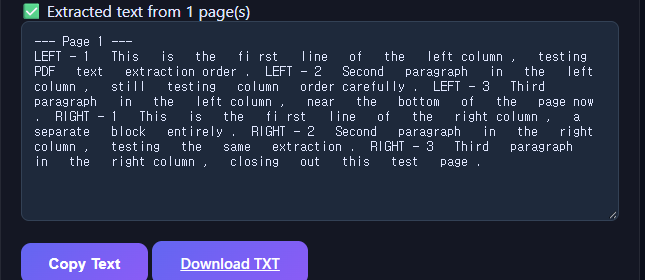
I'm not walking back the tool's own warning here, because "may" is an honest word for a layout-dependent failure, not a promise of always happening. A two-column page with six evenly sized paragraphs built in a browser's native CSS column layout is probably close to the easiest version of this problem for PDF.js (the library the tool runs on, Apache-2.0) to get right, since the column boundaries are clean rectangles and nothing overlaps. A page with floated sidebars, pull quotes crossing both columns, or a layout exported from desktop publishing software is a different and harder test I haven't run yet.
What I watched on the network tab
I attached a request listener before dropping the file in and kept it running through the whole extraction: zero network requests. That matches what the page says about running entirely through PDF.js in the tab, and it matches the same zero I've measured on every other file tool on this site so far, this is just one more file type added to that pile of measurements rather than a new finding by itself.
The other limit on this page, still unverified
The same limits section also says scanned PDFs, meaning pages that are really just a picture of text with no text layer underneath, extract nothing, because this tool does not do OCR. I tried to build a clean test for that today (an image-only PDF with no embedded text) and ran into tooling trouble generating the file itself before I could even get to testing the extractor, so I'm leaving that claim unverified rather than writing it up as confirmed. If the column-order warning turned out to be more cautious than the real behavior, the scanned-PDF warning deserves its own direct test rather than an assumption that the pattern repeats. That's a good excuse to come back to this same tool with a different test file later.
One thing I checked directly in the output text itself, not just the result box on screen: there wasn't a single raw line break anywhere inside my six paragraphs, only one marker line for the page number at the top. All six paragraphs came through as one continuous run of text, each sentence flowing straight into the next with plain spaces. That's convenient for my test file because the source was ordinary wrapped prose, but the page's own Good to know section warns that line breaks follow the PDF's internal layout and points to a separate Remove Line Breaks tool for cleanup, which tells me other PDFs, ones built from fixed-width text, code blocks, or software that hard-wraps every visual line, would come out looking very different from mine: lots of short fragments instead of the flowing paragraphs I got. My test happened to land in the easy case for that limit too, the same way it did for the column-order warning, so I'd treat both results as "this specific page layout did well" rather than "this warning doesn't apply."
For the job this page is actually built for, pulling the plain text out of a normal PDF without uploading it anywhere, it worked the way the headline promises, and on the one edge case I pushed on, it did better than its own fine print suggested. Try it yourself: PDF to Text, or browse the full tool list. The same extraction is also available as a REST endpoint and through the MCP server.