I asked a PDF splitter for a page it didn't have, and for one page twice
I built a plain 5-page test PDF, one word per page ("PAGE 1" through "PAGE 5"), and ran three inputs through Split PDF: a reversed order, a repeated page number, and a page number past the end of the file. I expected all three to either work quietly or fail quietly. Instead I got two silent successes and one input that stopped me cold with an error message, and it wasn't the one I would have guessed.
Reversed order: "5,1" came back as page 5, then page 1
I typed "5,1" expecting the tool to sort it back into reading order before extracting, since that's what I'd have guessed a "smart" splitter would do. It didn't. I downloaded the result and read the text of each output page directly: page 1 of the output was "PAGE 5 Appendix", page 2 was "PAGE 1 Cover". The order I typed is the order I got, no sorting applied. That's actually useful if you want to move a signature page to the front of a PDF, but it means a typo in the page order becomes a typo in the output with no warning.
Duplicate page: "3,3" extracted the same page twice without comment
Next I typed "3,3", a plain duplicate with nothing invalid in it. It went through to "Extracted 2 page(s)" with no warning that I'd asked for the same page twice. I downloaded it and read both output pages: "PAGE 3 Body" on page 1, "PAGE 3 Body" again on page 2. The tool had no opinion about whether that made sense, it just did what I asked.
Out-of-range page: "3,3,6" is where I actually got stopped
This is the one that surprised me. I added a page number the file doesn't have, since it only has 5 pages, and typed "3,3,6" expecting the same quiet behavior, maybe the 6 just gets dropped. Instead the Extract Pages button refused and printed a specific message: "Use page numbers between 1 and 5, for example 1-3, 5. Not understood: 6". Nothing was extracted, no file was produced, and I had to fix the input before trying again.
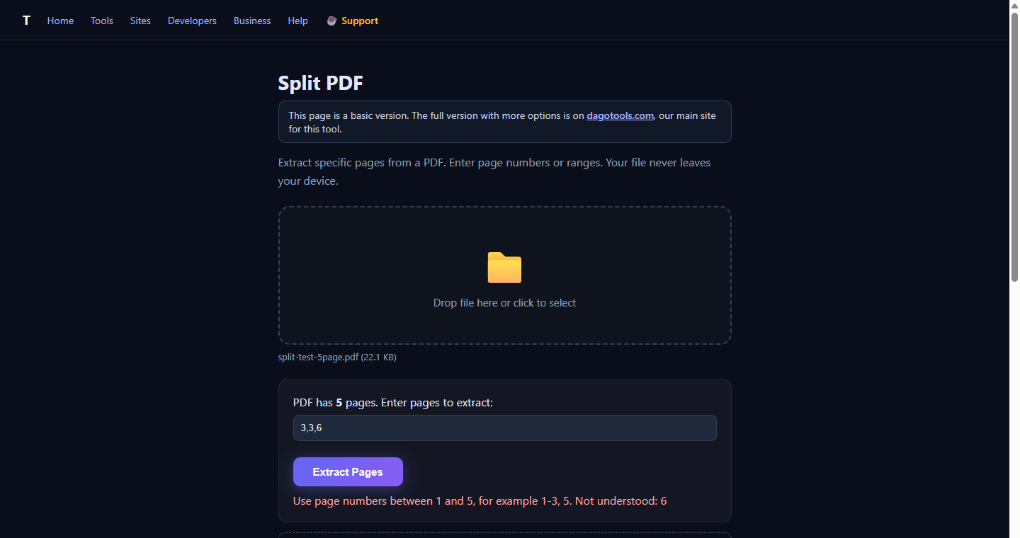
So the tool checks page numbers against the actual page count before running, but it doesn't check for duplicates. Two different kinds of "did you mean this" input, two different outcomes. I'm noting that as a real, mildly interesting inconsistency rather than a bug: catching out-of-range numbers protects you from a confusing empty result, while allowing duplicates is arguably the more useful default since there's a legitimate reason to want the same page twice (say, as a cover and an appendix reference).
What I watched on the network tab the whole time
All three attempts, plus the two successful downloads, ran with a request listener attached from the moment I dropped the file in: zero network requests across all of it, including the attempt that errored out. The error message came from code running in the tab, not from a round trip to a server checking my input. I also pulled the response headers for the page itself and checked the connect-src directive in its Content-Security-Policy: it's scoped to one specific error-logging endpoint on the same domain, not wide open and not fully blocked either. So the page could, in principle, phone home to that one logging address, but it can't reach anywhere else, and in three separate attempts (two successes, one error) it didn't reach even that. Between the request listener staying silent and the narrow allow-list in the header, I'm comfortable saying this specific check (page range validation) genuinely runs client-side rather than being a server response dressed up to look instant.
Why the duplicate-vs-invalid split matters for real files
This came up because of a dumb mistake I actually make: typing page ranges by hand from a printed index and getting a digit wrong. The out-of-range check catches the case where I transpose a page number into something that doesn't exist, which is the error I make most often and the one most likely to silently produce a half-empty document if it weren't caught. The duplicate case is different, I've never once meant to extract the same page twice by accident. If I type "3,3" it's because page 3 is doing double duty in my output, maybe as both a cover reference and an appendix item, and the tool treating that as valid rather than flagging it as probably-a-typo matches how I'd actually want it to behave.
If you only need one page pulled out, or you're reordering a file, that's the whole job: upload once, type page numbers, download. If you're splitting into many separate files instead of pulling pages into one, you'd run this more than once with different ranges, since this basic version builds one output file per extraction, not a batch of them. For per-page control with thumbnails you can drag around instead of typing numbers, there's a fuller version of this tool on dagotools.com, which I haven't put through the same three tests yet; that's worth its own look later since the interface is different enough that the same inputs might behave differently again.
Try it yourself: Split PDF, or browse the full tool list. The same job is also available as a REST endpoint and through the MCP server.