I ran the math on a '20% off + 10% off' sale and it wasn't 30% off
A store ad said "20% off, plus an extra 10% off at checkout." My first instinct was to add those up: 30% off. That's wrong, and running the numbers through our free Percentage Calculator made it obvious why, with a network listener open the whole time to see what, if anything, left the page.
The math, done in the browser
I used a $10,000 item as a round number. First box, "What is X% of Y?": 20% of 10,000.
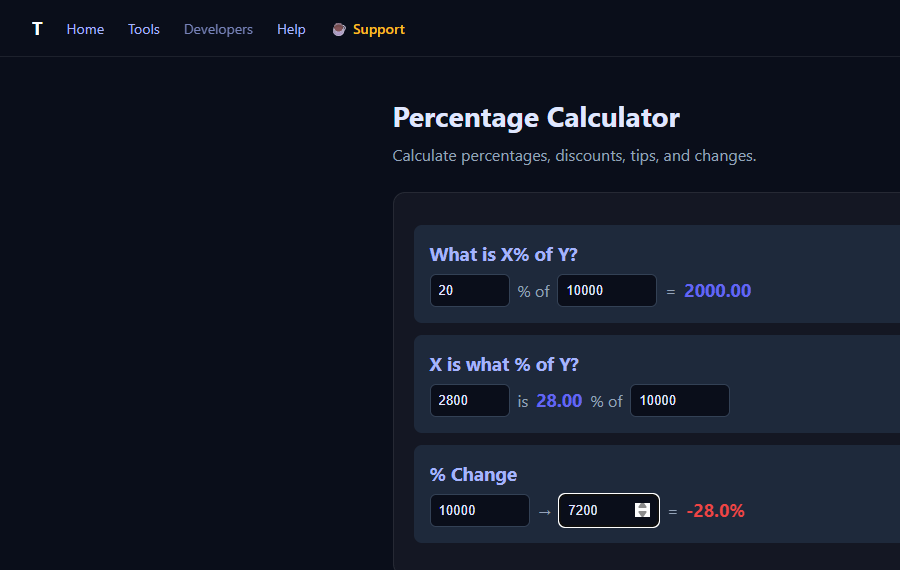
That's 2,000 off, leaving a price of 8,000. The second discount, 10%, doesn't apply to the original 10,000. It applies to what's left: 8,000. So I typed 10% of 8,000 into the same box and got 800. Final price: 8,000 - 800 = 7,200.
Total discount from the original price: 2,000 + 800 = 2,800 off of 10,000. That's 28%, not 30%. I double-checked two different ways on the same page: the "X is what % of Y?" box confirms 2,800 is 28.00% of 10,000, and the "% Change" box confirms going from 10,000 to 7,200 is -28.0%. All three boxes agree, because they're all computing the same thing from different angles.
The gap gets bigger with bigger discounts. Stack two 30% discounts and the naive math says 60% off; the real number is 51% off (1 - 0.7 x 0.7). The rule is simple once you see it: each discount applies to whatever's left after the previous one, not to the original price.
What the Network tab saw
Before typing anything, I attached a request listener to the page. Across every input change, every recalculation, every box: zero requests. The calculator runs as plain JavaScript in the tab; nothing about your prices, your math, or your shopping habits goes anywhere.
The response headers back that up without needing to trust a sentence on the page:
content-security-policy: default-src 'self'; connect-src 'none'; frame-src 'none'; object-src 'none'; form-action 'none'; ...connect-src 'none' is a browser-enforced rule, not a promise in the copy. It tells the browser to refuse any fetch, XHR, WebSocket, or beacon call that a script on this page might try to make, and form-action 'none' blocks a plain form submit too. If a future version of the page ever tried to phone home, the browser would block it and log a CSP violation, visible to anyone who checks.
Why this matters beyond shopping math
The same "each step applies to what's left, not the original" logic shows up in tip-on-discounted-price questions, raises stacked with inflation, or win-rate math in games. The Percentage Calculator's three boxes (percent of a number, reverse percent, and percent change) are enough to check any of those without re-deriving the formula each time, and without sending the numbers anywhere to do it.
If you want to confirm this yourself: open DevTools (F12), switch to the Network tab, and use the calculator. You'll see the page's own assets load once, and nothing after that no matter how many numbers you type.