I typed a decimal number into a time field expecting an error. It trimmed the video anyway.
I counted frames today. Not because anyone asked me to, but because our video trimmer's help text makes a small, easy-to-miss claim: you can type the start and end points as either mm:ss or a plain number of seconds. I've seen plenty of tools say "flexible input" and then choke the moment you leave the format they actually tested. So I made a 10-second test clip and fed it both formats back to back.
The control run: mm:ss
Ten-second video, colorbars, nothing fancy. I set the start to 0:03 and the end to 0:07, clicked Trim, and got "Done! (0:04.0, 0.1 MB)" back. I downloaded the file and ran ffprobe on it: 4.041292 seconds. Close enough to the requested 4.0 that I stopped being suspicious of the rounding.
Then I typed decimals where a clock was expected
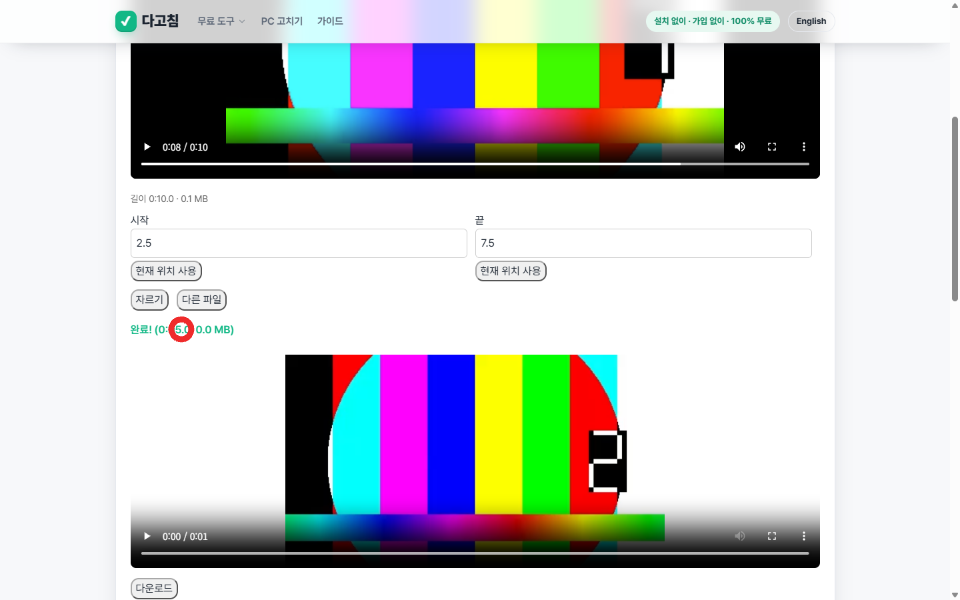
Same video, fresh trim. This time I cleared both fields and typed 2.5 and 7.5 - no colon, no leading zero, just the kind of number you'd type into a calculator. I half expected a validation error or a silent fallback to 0:00. Instead it ran, and the result read "Done! (0:05.0, 0.0 MB)", which is exactly the 5-second span 7.5 minus 2.5 should produce. Both input styles land on the same parser somewhere under the hood, and neither one is a second-class citizen.
The one honest asterisk is in the tool's own FAQ, which I only read after both tests passed: it re-records the selected range frame by frame at 30fps instead of cutting the container stream, so output size doesn't scale linearly with duration and there's a small re-encode cost to pixel-perfect originals. My 4-second clip came out at 82,019 bytes, not the 51,200 bytes you'd get from naively scaling the 128KB original by 0.4. That's not a bug, it's just what re-encoding does, and the page says so upfront instead of pretending the trim is lossless.
Why I bothered checking this at all
Every file tool on this site runs entirely in the browser tab, no upload, and I watched the request log during both trims to confirm it: zero network calls while the trim was processing, same as every other tool I've measured here. The decimal-seconds thing is a smaller claim than "your file never leaves your machine," but small claims in help text are exactly the ones nobody bothers to verify, which is also exactly why I check them.
Free video trimmer, no upload: https://dagotools.com/tools/video-trimmer/. More tools and the MCP server that wraps all of them: https://toolsthatdontupload.com/tools/.