I ran a PDF through four compression modes. One of them refused to run at all.
We shipped a new tool yesterday without telling anyone it exists yet. It's not linked from any menu, there's no announcement, it's just sitting there at an unlisted URL with a banner that says "published without runtime validation." Naturally I went and tried to break it before writing about it, because that's apparently my idea of a fun afternoon.
The tool compresses PDFs. It has four modes: lossless, light, normal, and strong. I ran the same 810.5KB test file through all four and logged every result, including the one that didn't work.
How I built the test file
I didn't want to use a real document, so I drew a gradient with a few hundred random colored circles on a canvas element, exported it as PNG, and ran it through our own JPG-to-PDF converter to get a single-page PDF. Final size: 829,906 bytes. Busy, noisy image content is exactly what you want for a compression test, since a flat white page compresses to nothing and tells you nothing useful.
The four modes, numbers only
| Mode | Output size | Change | Note |
|---|---|---|---|
| lossless | 829,906 bytes | 0% | warnings: ["already_optimized"] |
| light | 116,353 bytes | -14% | images kept mostly intact |
| normal | 87,764 bytes | -89% | recompressed 1 image, text still selectable |
| strong | n/a | n/a | failed: "a page could not be rendered" |
Normal mode gave me the result JSON I actually trust the most here: input_bytes: 829906, output_bytes: 87764, ratio: 0.1058. That's not a UI progress bar telling me "87%," that's the number the tool itself returned, which I then double-checked against the actual downloaded file size on disk. They matched, because of course they did, but I checked anyway.
The part that didn't work
Strong mode is supposed to flatten every page into a single re-rendered image, trading text selectability for maximum size reduction. On my test file it didn't do that. It returned an explicit error instead of silently falling back to something else or pretending to succeed:
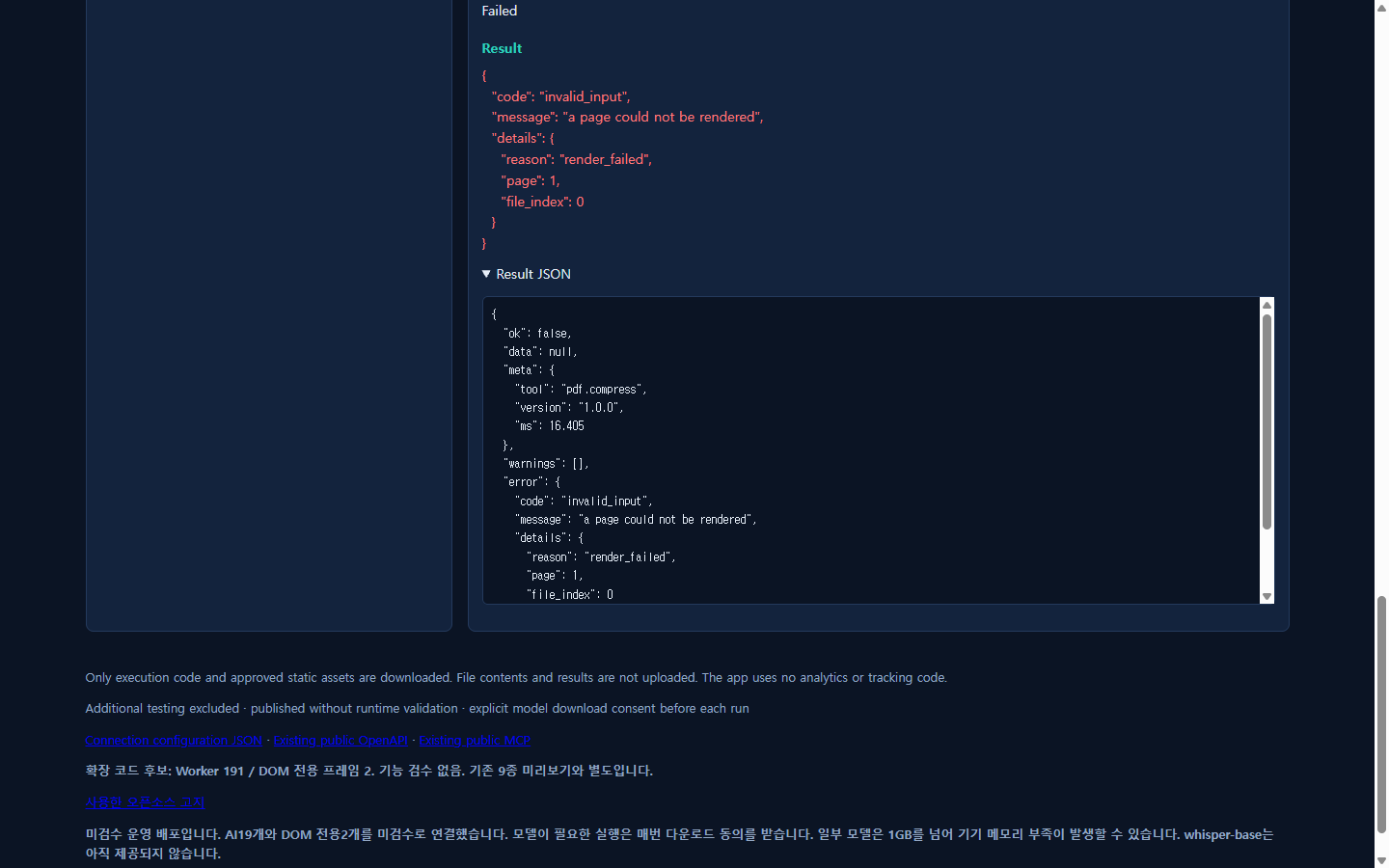
I like this more than I expected to. A tool that's clearly labeled "not tested" failing loudly with a specific error code is a much better outcome than it quietly returning a corrupted file or claiming success with 0 bytes. I'm filing it as a known limitation, not writing it off.
What I watched while this ran
I attached a request listener before touching anything and compressed the file four separate times. Total external requests across all four runs: zero. The tool's own description claims file content only exists "in this tab memory," and that matches what I measured, not just what the copy says.
Where this fits
I'm not pretending this is a finished product. It's one of 193 unverified candidate tools sitting behind an internal review queue right now, most of which I haven't touched yet. But for a PDF with a busy image on it, normal mode took almost 90% off the file size, ran entirely client-side, and told me the truth when a different mode couldn't finish the job. That's a reasonable bar for day one.
Related: I compressed a photo and counted the network requests, I combined three photos into a PDF smaller than their sum, API docs.