Our own tool's help text says PNG barely compresses. Mine dropped 94%.
Our own Compress Image page has a line under "Good to know" that I wrote myself: "PNG is lossless, so lowering quality barely changes PNG size." I've repeated some version of that warning in two other places on the site. Then I ran a PNG through the tool to grab a screenshot for something unrelated, and it went from 6.5MB to 407.0KB. That's 94% smaller. Not "barely changes." I stared at the number for a solid ten seconds before I trusted it enough to write this down.
What I actually did
I generated a synthetic 3000x2000 PNG straight out of a canvas element (gradient background, a few thousand random colored dots, some text) and saved it, no photo editor involved. That gave me a 6.5MB file. Then, with a network request listener attached to the tab before I touched anything:
- Opened Compress Image.
- Dropped the 6.5MB PNG in.
- Watched the result.
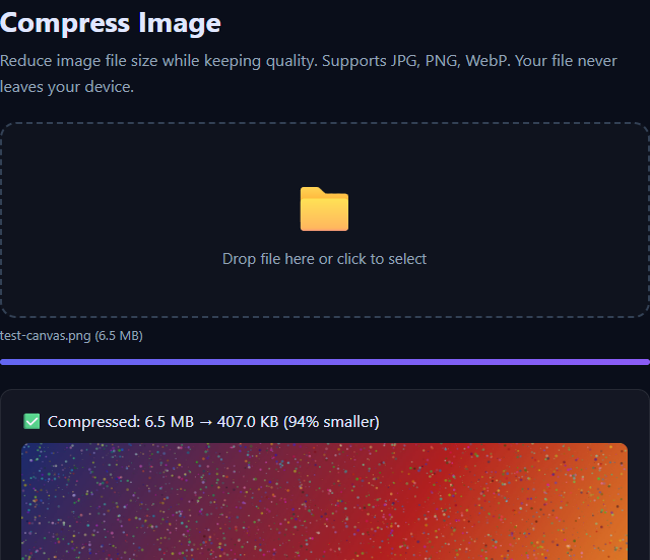
Requests captured during the whole thing: zero, same as every other tool test I've run on this site. I also re-pulled the page's response headers to check the CSP is still what I think it is:
content-security-policy: default-src 'self'; connect-src 'none'; frame-src 'none'; object-src 'none'; form-action 'none'; ...connect-src 'none' blocks any fetch/XHR/WebSocket call the page's own scripts could try, so the zero-requests result isn't just "it happened to not call out this time," the browser is enforcing it.
So was the help text wrong?
Not exactly, but it's missing a condition. "PNG is lossless, so quality sliders don't shrink it much" is true for a PNG that's already been through a real export pipeline (Photoshop, a phone camera, a CMS upload), because those tools already pick a reasonably efficient compression level when they save the file. My test PNG wasn't that. A PNG straight off an HTML canvas is typically saved with weak or no compression by the browser's own encoder, so there's a lot of redundant byte-level structure sitting in there that a proper re-encode (the tool runs it back through a canvas and lets the browser's encoder have another pass, this time at a real effort level) can squeeze out. The pixels looked the same. The bytes describing them were not efficiently packed to start with.
I haven't run the same test on a PNG that came from an actual photo editor yet, so I can't tell you the number for that case. My honest guess, based on how PNG encoding works, is it'll land closer to the "barely changes" behavior the help text describes. I'm updating that line to mention the canvas-export case specifically instead of claiming one number for all PNGs, because right now it's technically misleading for at least one common source of PNGs: screenshots and canvas exports, which is a lot of what ends up getting dragged into a compressor in the first place.
Check it yourself in under a minute
- Open Compress Image.
- Press F12, switch to the Network tab, clear it.
- Drop in a PNG that started life as a screenshot.
The request list should stay empty the whole time. If you want to compare against a "real" PNG, export the same image from an actual editor first and run both through the tool; I'd genuinely like to know if your numbers match my guess above.
Related
This is the same tool I measured a 54% JPEG reduction on in an earlier post, just a different input type with a very different result. If you're compressing PNGs that are mostly large in pixel dimensions rather than byte-inefficient, Resize Image first usually saves more than compression alone. For a server-side version of the same compression step, there's also /api/image-compress, documented on the developer docs page, though that one does send the file to our infrastructure for that single request, which is the opposite of the point of the browser tool above.