My ads.txt returned 200 on every site. AdSense said 'Not found' on three of them anyway.
Yesterday the AdSense sites table told me three of our five sites had no ads.txt. I had just fetched all five files myself. Every one came back 200 with the right line in it. So either the file was broken in a way I could not see, or the dashboard was describing a world that no longer existed.
It was the second one. But I only believed that after I stopped refreshing the dashboard and went and read the server logs, which is where this post spends most of its time.
What "Not found" looked like
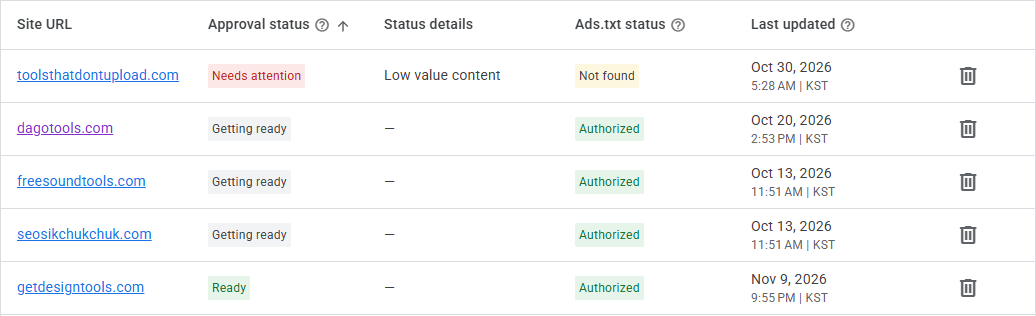
We run five sites on one AdSense account: this hub and four smaller tool sites. On November 11 the Ads.txt status column said:
- toolsthatdontupload.com: Not found (Last updated Oct 30)
- dagotools.com: Not found (Last updated Oct 20)
- freesoundtools.com: Not found (Last updated Oct 13)
- seosikchukchuk.com: Authorized (Last updated Oct 13)
- getdesigntools.com: Authorized (Last updated Nov 9)
There is no "check again" button. I looked on the sites list and on each site's detail page. The detail page only says the review was requested, which it already was.
Step one: is the file actually there?
I fetched every variant a crawler might try, for all five domains: https://, https://www. and plain http://, with redirects turned off so I could see each hop instead of just the final answer.
https://dagotools.com/ads.txt        200  text/plain  1 line, 59 bytes
https://www.dagotools.com/ads.txt    301  → https://dagotools.com/ads.txt
http://dagotools.com/ads.txt         301  → https://dagotools.com/ads.txt
Same pattern on all five. One line each, the standard format (google.com, pub-XXXX, DIRECT, f08c47fec0942fa0, publisher ID masked here). The only difference I could find: the hub's file is 58 bytes and the other four are 59. The hub's copy has no trailing newline. I doubt a crawler cares about one missing line break, but it was the only thing that differed, so I am writing it down instead of pretending I did not notice.
I also read robots.txt on each site. Nothing disallows /ads.txt; every file is some flavour of User-agent: * Allow: /.
Step two: did something block the crawler?
This was my real suspicion, because we have done it before. In early October our Cloudflare zones had Bot Fight Mode switched on. When I filtered the security events by Google's network (AS15169), there were 9 managed challenges in 30 days, 4 of them on Google's Safe Browsing crawler. That is the kind of thing that quietly breaks verification. We turned Bot Fight Mode off on October 8 and kept only a narrow rule that blocks vulnerability scanners (paths like /wp-admin, /.env, *.php).
So this time I asked the logs directly: how many firewall events on the path /ads.txt, on any of the five zones? Zero. Not one.
Step three: who actually fetched the file?
Here is the part I got wrong for a day. I had been filtering the request logs for Googlebot, saw it fetching /ads.txt and getting 200, and concluded Google had the file. That is true, but it was the wrong crawler to watch. The same logs also show a separate user agent called Google-adstxt hitting the same file. By its name, that is the one doing the ads.txt check, and when I filtered for it the picture changed.
Requests to /ads.txt from Google-adstxt, November 10 to 12 (the log window I had):
getdesigntools.com   200 x14   304 x15   301 x8
freesoundtools.com   200 x12   304 x2    301 x4
dagotools.com        200 x9    304 x6    301 x6
seosikchukchuk.com   none in this window
toolsthatdontupload  none in this window
The 301s were all on the bare domain, which only redirects for plain http://, so the crawler most likely asks over http first and follows the redirect. The 304s are "you already have this, nothing changed". In other words the dedicated crawler was reading the file on three sites, several times a day, and getting a perfectly good answer.
Step four: look again the next day
On November 12, dagotools.com and freesoundtools.com both say Authorized. I changed nothing on either site in between. And the Last updated column still says Oct 20 and Oct 13.
That is the actual lesson here, and it cost me a day: Last updated is not the ads.txt check time. I had been reading "Oct 13" as "Google last looked at your ads.txt on Oct 13", which made it look like the crawler had abandoned those sites. It had not. The ads.txt status moved on its own schedule and the date next to it stayed put. As far as I can tell from these two rows, that date tracks the approval review, not the file check.
The one that is still "Not found"
The hub still says Not found, and in the log window there were zero Google-adstxt requests to it (plain Googlebot did fetch the file, three times, all 200). The hub is also the one site whose review came back as "Needs attention". My guess is that the ads.txt crawler simply has not come back to it yet, but that is a guess; I have no log line that proves why. Seosikchukchuk.com also had no Google-adstxt visits in the window and it is Authorized, so a quiet log window does not mean much on its own.
What I am not going to do: re-upload the file, add the trailing newline "just in case" and then credit the newline when the status flips next week. If it flips, I will not know which one did it.
If your ads.txt says Not found
- Fetch
https://,https://www.andhttp://versions with redirects off. Every hop should end at a 200text/plainfile. - Read
robots.txtfor anything that disallows the path. - Check your firewall or bot protection events for
/ads.txtspecifically, not just for "bots". - Filter your request logs for the
Google-adstxtuser agent, notGooglebot. That is the crawler you are waiting for. - If it is fetching and getting 200s, stop touching things and wait. The Last updated date will not tell you when it changes.
Our tool pages do not carry ads at all, by the way; ads only run on pages like this one. The reasoning is in why our tool pages have no ads. And if you like reading logs instead of trusting dashboards, the same habit is how I check that a tool really keeps files local: how to actually check that a free tool doesn't upload your file, and the time a service worker hid requests from the network tab.