I fed a barcode generator the same number twice. It caught every typo except that.
I was pasting stock numbers into a free barcode generator today and got curious about a dumb edge case: what happens if the exact same number ends up on the list twice, say from a copy-paste mistake while building a label sheet. I half expected the tool to shrug it off. It did something more interesting than that.
The single-barcode mode is stricter than I expected
First I tried the plain "One barcode" mode with EAN-13 selected. Type 12 digits and it computes the 13th check digit for you. I typed 880199988881 and it answered "the check digit was added: 3", then I did the math by hand (alternating weights of 1 and 3 across the first 12 digits, subtract the remainder from 10) and got 3 as well. Then I typed a 13-digit number with a deliberately wrong last digit, and the download buttons grayed out immediately with a message telling me the correct digit. You cannot export a barcode with a bad check digit from this mode. That part worked exactly like a barcode tool should.
Then I switched to bulk mode and tried to break it
Bulk mode lets you paste one value per line, up to 1,000, and download them all as a ZIP. I pasted four lines: a correct EAN-13, the same number with the check digit deliberately wrong, the correct number again verbatim, and a line of letters. The status read "2 ready, 2 with problems." It caught the bad check digit on line 2 and the non-numeric line 4, both flagged clearly. Lines 1 and 3, which were character-for-character identical, were both counted as ready. No duplicate warning anywhere.
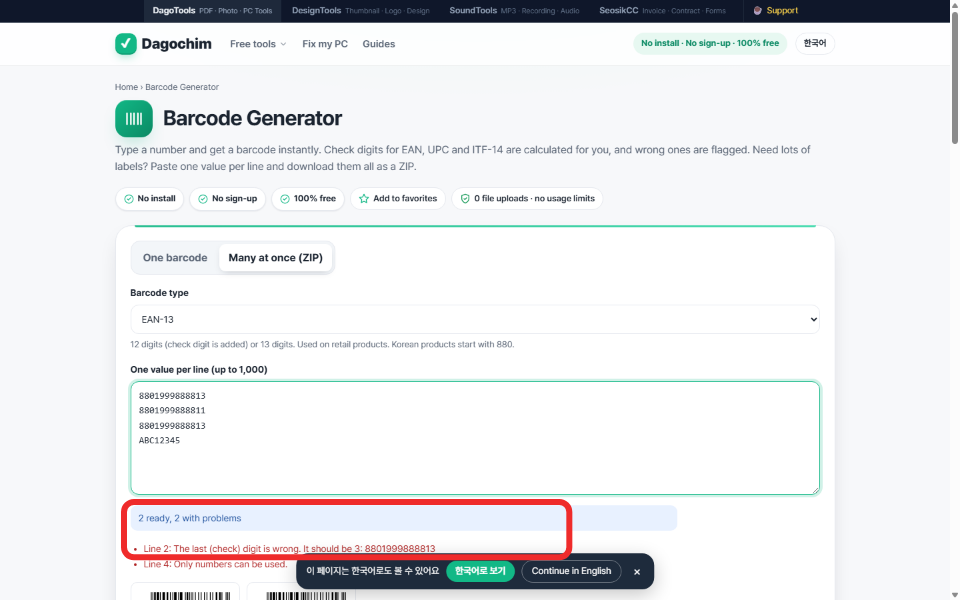
What the ZIP actually contained
I downloaded it and unzipped it with PowerShell's Expand-Archive. Two files came out: 8801999888813.png and 8801999888813_2.png, both exactly 13,873 bytes. Same barcode, same content, just a quiet _2 suffix to avoid a filename collision. The check digit validator runs per line and is genuinely strict about it. The duplicate comparison across lines simply does not exist, at least not in this version.
Why I don't think this is a bug, exactly
A checksum is a closed, deterministic calculation on one string. Flagging it is cheap and unambiguous. Detecting duplicates requires deciding what counts as a duplicate across potentially a thousand lines, and for shipping labels, printing the same real SKU twice on purpose is a completely normal thing to do. Silently making two identical files is at least honest about what happened. It would have been nicer with a soft notice, something like "lines 1 and 3 are identical," but I'd rather it stay quiet than start guessing which duplicates are mistakes.
What I watched while this ran
I attached a network request listener before touching anything and ran the full sequence twice, once in the Korean interface and once after switching to English. Total external requests across both runs: zero. The page itself credits the open-source JsBarcode library for the barcode math and fflate for zipping files locally, which lines up with what I measured: nothing left the browser.
The takeaway
If you're pasting a long list of SKUs into any bulk barcode tool, de-duplicate the list yourself first, in a spreadsheet, before pasting. Checksum validation is not duplicate validation, and at least for this tool, only one of those two things is actually happening.
Related: I fed a brand-new workflow the same receipt twice, I removed a background and the crop math matched exactly, API docs.