I fed an English recording to a new transcription tool. It came back in Korean.
I assumed a tool that ships with 20 language options in its schema would at least try to figure out what language it's listening to before committing to one. It doesn't. It defaults to Korean, silently, and the failure mode isn't an error message, it's a sentence that sounds plausible until you actually read it.
The tool is called Transcribe speech on device, one of the new unverified candidates sitting in the workflows catalog. It takes a WAV, FLAC or MP3 file, runs a Whisper model entirely in the browser, and returns timed segments shaped for subtitle building. Nothing leaves the tab.
The setup
I generated a 12-second WAV with Windows' built-in speech synthesizer so there's zero real personal audio involved: "Hello, this is a test recording for the transcription tool. The quick brown fox jumps over the lazy dog. Today is October twenty second, twenty twenty six." Standard pangram-adjacent test material, nothing a speech model should struggle with.
What I expected vs. what happened
I uploaded the file, left the input JSON at its default {}, and hit Run. Ten point seven seconds later I had a result with ok: true and a text field that read: "안녕하세요, 이 트랜스크립션을 제작하는 테스트입니다. 이 바이러스의 바이러스는" ("Hello, this is a test to make this transcription. This virus's virus is...").
The first sentence is a rough but recognizable match for "Hello, this is a test recording for the transcription tool." The second sentence is not a translation of anything I said. "The quick brown fox jumps over the lazy dog" became a phrase about a virus's virus, which is the kind of thing a language model produces when you force it to decode audio in a language it wasn't spoken in and it latches onto phonetically similar syllables instead.
Why it happened
Buried in the result JSON: "language": "ko", "language_detected": false. Not auto-detected, just defaulted. Whisper-family models take an explicit language token that tells the decoder what to expect, and if you don't supply one, this tool's default is Korean rather than genuine auto-detection. Feed it English audio under that assumption and it still returns ok: true, with no warning that the transcript might be nonsense.
I tried to override it with {"language":"en"} at the top level first and got a schema validation error: "must not have additional properties" at path /language. The input schema requires it nested under options, with an enum of 20 languages including an actual "auto" value.
Fixing it
Re-running with {"options":{"language":"auto"}} took 18.1 seconds (it re-fetched part of the model) and came back with "language": "en", "language_detected": true, and a transcript that was word-for-word correct, including converting "twenty twenty-six" to "2026."
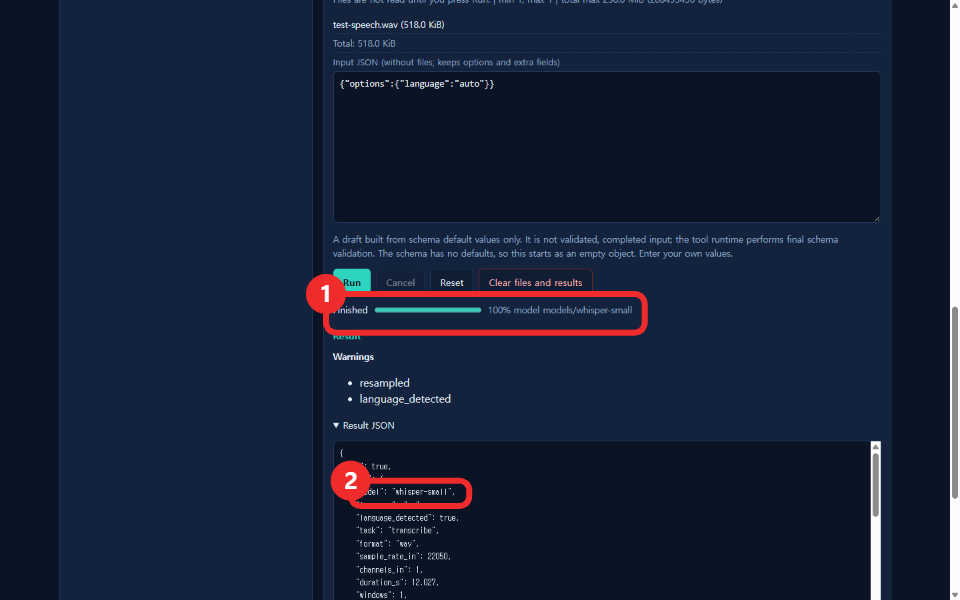
What I watched while this ran
I attached a request listener before uploading anything and ran the tool three times total (once in Korean UI with defaults, once with auto in Korean UI, once with auto in English UI). External network requests across all three runs: zero. The only data movement was the model files downloading into the browser, which the UI shows as an explicit progress bar with file paths like models/whisper-small/onnx/encoder_model_quantized.onnx before every run that needs them.
Where this fits
This is still labeled "Candidate / Not tested" in the catalog, and for the one thing I actually verified, it works correctly, it just doesn't warn you that leaving the language unset means Korean, not auto-detect. If you're building anything on top of this tool, set options.language explicitly. Don't trust the default, and don't trust a transcript just because the response says ok: true.
Related: I fed a brand-new workflow the same receipt twice, I removed a background and the crop math matched exactly, API docs.